Export or back up the relevant data first. Do not delete, void, unreconcile, or adjust historical transactions unless you understand the accounting impact.
Menu names can change. We link current first-party instructions so you can confirm product behavior before acting.
Identify the failure before applying a fix
After working offline, Sage says other users uploaded changes and asks whether to upload local data, download remote data, or continue offline.
Record the complete message, affected organisation or company, user, date range, and last successful action. A precise symptom is more useful than trying several broad repairs at once.
Checks before changing data
- Stop users from making more changes until the conflict is resolved.
- List the transactions entered at each site since the disconnect.
- Back up the local data and, where possible, the current shared data.
Resolution path
- Inventory the competing changes. Ask each site for the last successful sync time and the transactions or records changed afterward.
- Use audit reports and transaction references.
- Do not rely on file timestamps alone.
- Choose the authoritative dataset. Decide with the bookkeeping owner whether local changes should overwrite remote changes or the remote copy should replace local changes.
- Upload keeps the local changes and can overwrite others.
- Download keeps shared changes and can overwrite the local offline work.
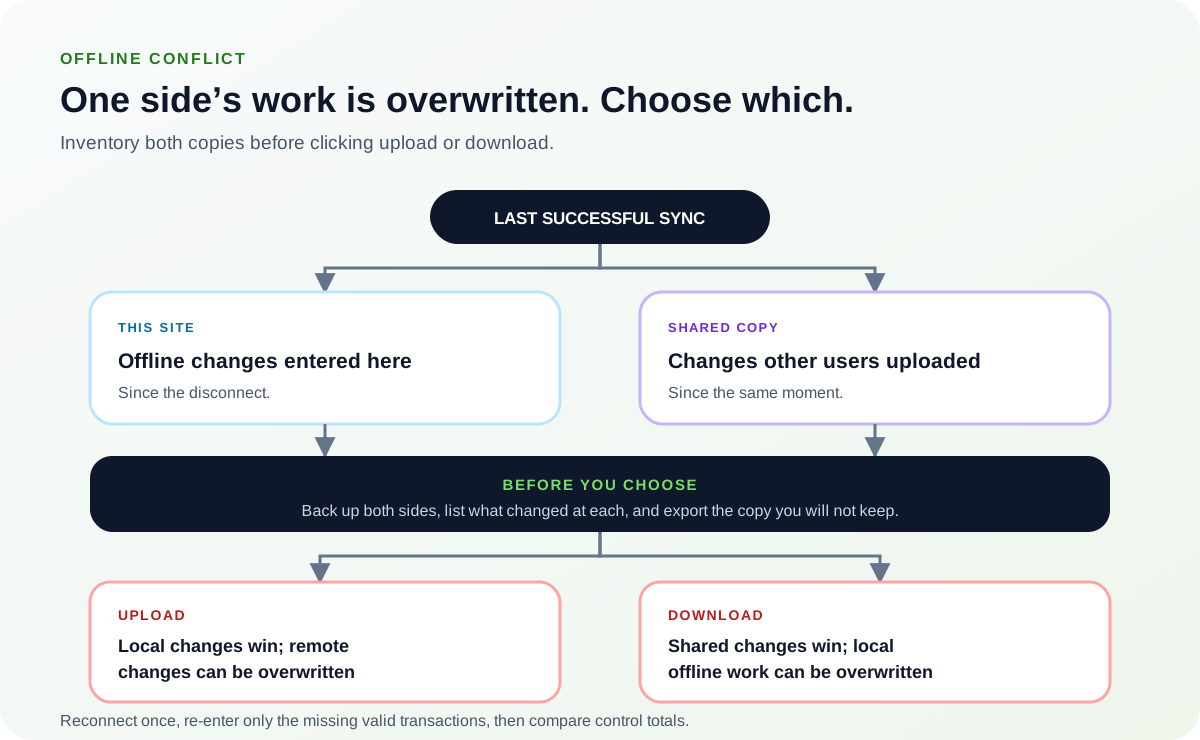
Upload and download are not two ways of doing the same thing. Decide which copy is authoritative, and export the transactions from the copy that will not be kept before choosing either direction.Source: Ledger Clinic original diagram - Preserve the losing work for re-entry. Export or report the transactions from the copy that will not be kept, then make a labelled backup.
- Record user, date, reference, amount, and source document.
- Keep the backup read-only until reconciliation is complete.
- Reconnect once and reconcile. Choose the documented upload or download action, then re-enter only missing valid transactions and compare control totals.
- Check for duplicated references.
- Run Check Data and key ledger reports.
Verify the result
A disappearing error is not enough. Confirm the accounting and workflow outcome:
- All sites open the same current company.
- Valid offline and remote work is present once.
- The chosen direction and re-entered items are documented.
What to avoid
- Clicking upload or download before inventorying both sides.
- Allowing continued posting during the decision.
- Merging by re-entering everything without checking for duplicates.
When to involve product support, IT, or your accountant
Stop making changes and escalate when any of these conditions applies:
- Both copies contain extensive valid changes.
- Payroll, VAT, or closed-period entries differ.
- Check Data or control totals change after reconnection.
Bring the exact error, screenshots, affected record IDs, timestamps, product version or region, and a description of every change already attempted. That evidence shortens the support path and reduces repeated or conflicting fixes.
Sources checked
First-party product documentation used to verify the workflow and risk notes in this guide.