Export or back up the relevant data first. Do not delete, void, unreconcile, or adjust historical transactions unless you understand the accounting impact.
Menu names can change. We link current first-party instructions so you can confirm product behavior before acting.
Identify the failure before applying a fix
A foreign-currency transaction, report, payment, or integration uses a rate that differs from the bank or another system.
Record the complete message, affected organisation or company, user, date range, and last successful action. A precise symptom is more useful than trying several broad repairs at once.
Checks before changing data
- Compare the exact transaction date, time zone, source currency, base currency, and rate direction.
- Check whether a user manually edited the rate.
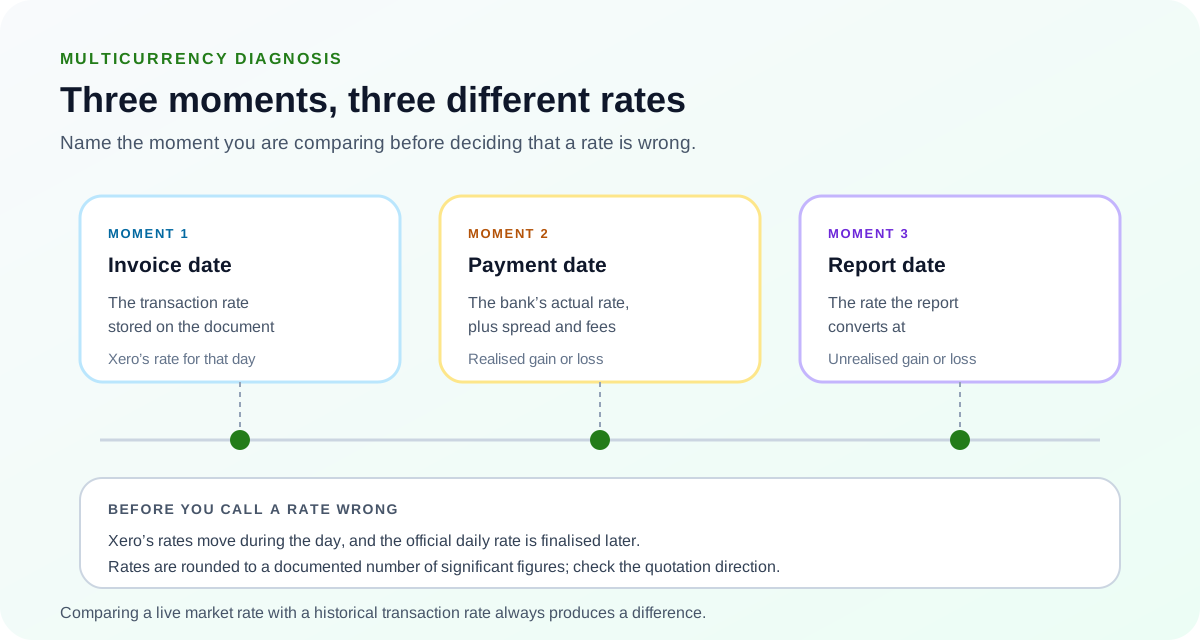
- Determine whether you are comparing a transaction rate, report-date rate, or settlement rate.
Resolution path
- Identify the rate Xero actually used. Open the transaction and relevant report, then note the stored rate and any exchange-rate disclosure.
- Xero rates update during the day and the official daily rate is finalised later.
- Rates are rounded to a documented number of significant figures.
- Compare like with like. Compare the Xero rate with the bank or contract rate for the same date and direction.
- Invert the comparison rate if the quotation direction differs.
- Include bank spreads and fees separately.
- Correct only when policy requires it. If the transaction should use a contracted or actual rate, update it with approval and retain the source evidence.
- Do not overwrite an organisation-wide rate to fix one transaction.
- Understand the effect on realised and unrealised gains or losses.
- Review reports after correction. Re-run the transaction and currency reports for the same date range.
- Confirm the base-currency amount.
- Document rounding that remains immaterial and expected.
Verify the result
A disappearing error is not enough. Confirm the accounting and workflow outcome:
- The rate source, date, direction, and rounding are documented.
- The base-currency value follows the approved policy.
- Any remaining difference is explained by fees, timing, or rounding.
What to avoid
- Editing rates until two reports happen to match.
- Comparing a live market rate with a historical transaction rate.
- Ignoring bank spread or settlement fees.
When to involve product support, IT, or your accountant
Stop making changes and escalate when any of these conditions applies:
- The transaction is in a filed period.
- A material realised gain or loss changes.
- The organisation’s accounting policy for exchange rates is unclear.
Bring the exact error, screenshots, affected record IDs, timestamps, product version or region, and a description of every change already attempted. That evidence shortens the support path and reduces repeated or conflicting fixes.
Sources checked
First-party product documentation used to verify the workflow and risk notes in this guide.