Export or back up the relevant data first. Do not delete, void, unreconcile, or adjust historical transactions unless you understand the accounting impact.
Menu names can change. We link current first-party instructions so you can confirm product behavior before acting.
Start with the operating model, not the vendor list
“Medium-sized business” is not a software requirement. A 70-person professional-services firm, a five-entity nonprofit, and a distributor with two warehouses may have similar revenue and completely different accounting needs. Define how the business operates today and what must change over the next three years.
The selection team should include the controller or finance lead, a daily bookkeeping user, an operational owner, IT or security, and the implementation partner. Executive sponsorship matters, but a demo chosen only by executives often misses the close, reconciliation, exception, and correction work performed every day.
Write requirements that can be demonstrated
Replace adjectives such as “scalable” and “easy” with testable scenarios:
- Entity structure: legal entities, branches, departments, locations, projects, funds, intercompany activity, eliminations, and consolidations.
- Controls: separation of duties, approval thresholds, custom roles, audit history, close locks, and administrator oversight.
- Revenue and cost: projects, subscriptions, inventory, landed cost, deferred revenue, grants, jobs, or contract billing.
- Reporting: board, lender, management, statutory, project, department, location, cash-flow, and budget-versus-actual outputs.
- Integrations: payroll, CRM, ecommerce, payments, expense, inventory, tax, banking, data warehouse, and identity provider.
- Service model: countries, currencies, local tax, support ownership, implementation capacity, and change management.
- Data ownership: export formats, API access, attachments, audit records, retention, backup, recovery, and exit plan.
For every requirement, state the sample data, expected result, authorised user, exception path, and evidence the vendor must provide.
Compare QuickBooks alternatives by the work they must support
Searches such as “accounting software other than QuickBooks,” “Xero or QuickBooks,” “Sage vs QuickBooks,” and “FreshBooks compared to QuickBooks” sound like product questions. They are really workflow questions. A useful comparison starts with the work that must be completed, the evidence the close must produce, and the complexity the team can operate reliably.
| Candidate | Put it on the shortlist when | Prove before choosing |
|---|---|---|
| QuickBooks Online | The team needs cloud bookkeeping, banking, invoicing, bills, reporting, accountant collaboration, and a broad connected-app workflow. | Plan-specific users and limits, permissions, reporting dimensions, project or inventory depth, integration behavior, and export coverage. |
| Xero | The team wants a cloud accounting alternative and its accountant or app stack already works comfortably in the Xero ecosystem. | The exact US plan, user controls, bank feeds, reporting, projects, inventory, payroll connection, and migration result required by your team. |
| FreshBooks | A service business gives unusual weight to client invoicing, payments, time, billable expenses, proposals, and project profitability. | Accountant workflows, financial-statement depth, bill and purchasing needs, user permissions, tax setup, integrations, and a complete data export. |
| Sage 50 or QuickBooks Enterprise | Desktop-dependent operations, local integrations, or established Windows workflows make a locally managed system a real requirement. | Hosting model, remote access, concurrent users, database maintenance, backups, updates, support ownership, and disaster recovery. |
| Sage Intacct | Multi-entity consolidation, intercompany activity, dimensional reporting, approvals, and stronger finance controls drive the decision. | Entity design, eliminations, allocations, shared vendors, currency, role design, implementation scope, and recurring administration. |
| Business Central or another ERP | Finance must share one controlled operating model with purchasing, inventory, warehouse, projects, service, or manufacturing. | End-to-end process design, implementation partner, customizations, integrations, testing, training, security, and total ownership cost. |
This is a screening map, not a verdict. Product names do not prove fit, and vendor pages describe capabilities rather than your configuration. Confirm the current edition and plan in the official documentation, then make each finalist demonstrate the same scripted transactions, exceptions, corrections, approvals, close tasks, and exports.
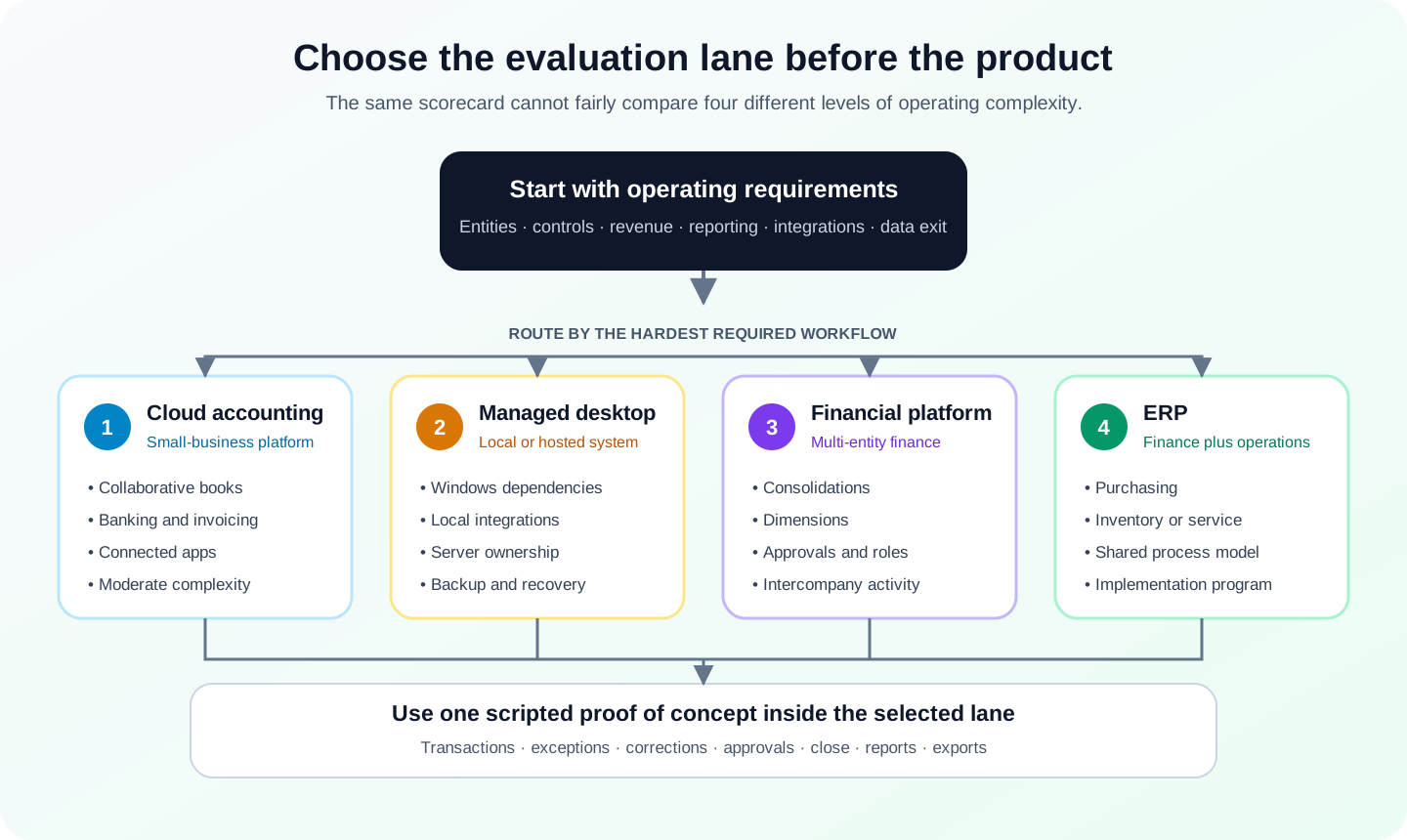
Build the shortlist by complexity threshold
Cloud small-business platforms
QuickBooks Online Advanced and Xero can remain strong candidates when the organisation primarily needs collaborative general-ledger, receivables, payables, banking, reporting, and a connected-app ecosystem. Test user roles, reporting dimensions, volume limits, backup or restore behavior, and the exact integrations rather than assuming the highest plan removes every constraint.
Locally managed or desktop-dependent workflows
QuickBooks Enterprise or Sage 50 may fit organisations with established Windows workflows, local integrations, or a requirement to hold the working company data in a managed environment. The evaluation must include server ownership, remote access, multi-user reliability, backups, update responsibility, and disaster recovery—not only license cost.
Multi-entity and dimensional financial management
Sage Intacct belongs on the shortlist when entity consolidation, inter-entity activity, and dimensional reporting are central requirements. Test how the proposed design handles due-to and due-from entries, eliminations, shared vendors, currency, allocations, and entity-level access with your own structure.
Finance joined to broader operations
Dynamics 365 Business Central and similar ERP products become relevant when finance must share a controlled system with purchasing, fulfilment, inventory, warehouse, projects, service, or manufacturing. That broader scope increases the value of one model but also expands implementation, process design, testing, training, and support responsibility.
Use a weighted scorecard with veto requirements
A practical scorecard separates must-pass controls from weighted preferences:
- Veto criteria: regulatory, currency, entity, security, data-residency, audit, or integration requirements that must pass.
- Workflow fit: score the demonstrated day-in-the-life scenarios, including corrections and exceptions.
- Control fit: score roles, approvals, audit evidence, period controls, and administrator governance.
- Data fit: score migration coverage, exports, API, backup, restore, retention, and exit capability.
- Delivery risk: score implementation partner, internal capacity, testing effort, training, and support ownership.
- Total cost: model subscription, users, modules, partner implementation, integrations, migration, support, internal labour, and future change.
Do not let a low subscription price compensate for a failed control or a missing business-critical workflow.
Run a proof of concept with the hardest month
A scripted proof of concept should use anonymised real records from a difficult close period. Include opening balances, a bank account, customer and supplier cycles, corrections, an approval, a reconciliation, a key integration, and the management reports used to approve the month.
Require the proposed implementation team—not only a sales engineer—to explain configuration, workarounds, data movement, controls, and unresolved gaps. Record which result is native, configured, delivered by an add-on, custom-built, or manual.
Plan migration and cutover before signing
Decide whether the target receives opening balances, open transactions, detailed history, attachments, payroll, audit data, and comparative periods. “Full migration” is meaningless until every record class and validation report is named.
- Clean customers, vendors, accounts, items, tax codes, and duplicate records before the final conversion.
- Define control totals for the trial conversion and final cutover: trial balance, receivables, payables, bank, inventory, retained earnings, and key subledgers.
- Run at least one full rehearsal with timing, defects, owners, rollback criteria, and user acceptance.
- Freeze source entry during final cutover and preserve a read-only source system or compliant archive.
- Reconcile the first close in the new system before retiring source access.
The best choice is the system that passes the required controls, supports the operating model, produces the needed evidence, and can be implemented and owned by the actual team. A generic ranking cannot make that decision.
Optional free utilities
Tools that support this workflow
These run in your browser and can help prepare or inspect files. They do not replace reconciliation, source-document review, or an accountant’s approval.
Sources checked
First-party product documentation used to verify the workflow and risk notes in this guide.
- QuickBooks Online Advanced featuresIntuit QuickBooks · Checked August 2026
- Xero accounting software overviewXero · Checked August 2026
- FreshBooks accounting featuresFreshBooks · Checked August 2026
- Sage Intacct multi-entity managementSage · Checked August 2026
- Dynamics 365 Business Central capabilitiesMicrosoft · Checked August 2026