Export or back up the relevant data first. Do not delete, void, unreconcile, or adjust historical transactions unless you understand the accounting impact.
Menu names can change. We link current first-party instructions so you can confirm product behavior before acting.
Identify the failure before applying a fix
Sage shows a disconnected bank, no new transactions, an expired authorisation, or missing activity after the expected feed delay.
Record the complete message, affected organisation or company, user, date range, and last successful action. A precise symptom is more useful than trying several broad repairs at once.
Checks before changing data
- Confirm whether you use Sage Accounting or Sage 50 Accounts; menus and feed providers differ.
- Check Sage’s bank-feed status and the bank’s online service.
- Record the latest transaction already present before reconnecting or importing.
Resolution path
- Separate a normal delay from a failed feed. Check whether cleared transactions are merely delayed and whether Sage reports a current incident.
- Use the product’s documented wait period before treating recent lines as missing.
- Verify the feed still shows connected.
- Renew or reconnect once. If the documented checks point to a stale connection, disconnect and reconnect using the product workflow.
- Choose a start date after the latest transaction already entered.
- Complete any bank reauthorisation or new terms.
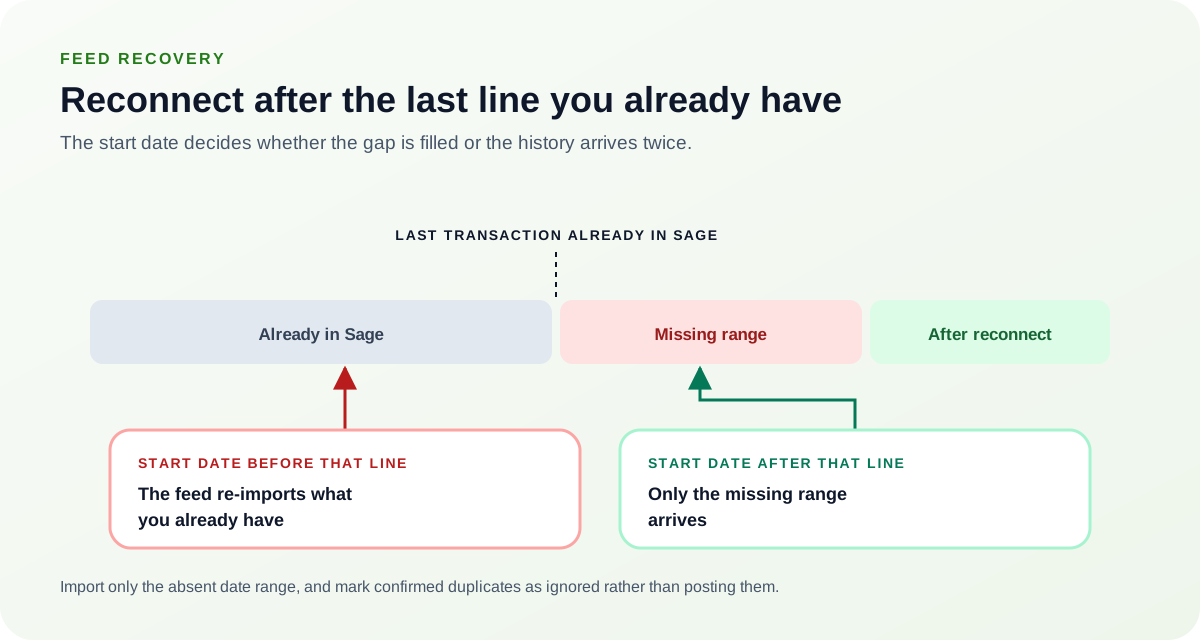
Record the latest transaction already present before you reconnect. A start date that predates it re-delivers history Sage already holds, which is the usual source of feed duplicates.Source: Ledger Clinic original diagram - Import a controlled missing range if needed. Export only the absent date range from the bank and prepare it for Sage’s statement import.
- Retain the original bank export.
- Scan for overlap with existing entries before import.
- Reconcile after recovery. Compare the imported or refreshed activity with the bank and mark confirmed duplicates as ignored rather than posting them.
- Check transfers from both accounts.
- Document the recovered date range.
Verify the result
A disappearing error is not enough. Confirm the accounting and workflow outcome:
- New cleared transactions arrive or the missing range is imported once.
- The Sage balance agrees with the bank for the same date.
- No overlapping lines were posted.
What to avoid
- Repeated disconnect and reconnect attempts with the same start date.
- Importing the entire year to replace a short missing range.
- Posting duplicate inter-account transfers from both feeds.
When to involve product support, IT, or your accountant
Stop making changes and escalate when any of these conditions applies:
- The feed repeatedly duplicates or omits transactions.
- Sage’s status page shows no issue but the feed remains unavailable.
- The bank requires account-owner action you cannot complete.
Bring the exact error, screenshots, affected record IDs, timestamps, product version or region, and a description of every change already attempted. That evidence shortens the support path and reduces repeated or conflicting fixes.
Optional free utilities
Tools that support this workflow
These run in your browser and can help prepare or inspect files. They do not replace reconciliation, source-document review, or an accountant’s approval.
Sources checked
First-party product documentation used to verify the workflow and risk notes in this guide.