Export or back up the relevant data first. Do not delete, void, unreconcile, or adjust historical transactions unless you understand the accounting impact.
Menu names can change. We link current first-party instructions so you can confirm product behavior before acting.
Identify the failure before applying a fix
An import, connected app, bank workflow, or transaction cannot use an account because it is archived, deleted, locked, or no longer available.
Record the complete message, affected organisation or company, user, date range, and last successful action. A precise symptom is more useful than trying several broad repairs at once.
Checks before changing data
- Identify the exact account code and whether it is archived or permanently deleted.
- Check whether historical transactions still depend on the account.
- Find every bank rule, repeating transaction, import mapping, and connected app that references it.
Resolution path
- Distinguish archived from deleted. Archived accounts retain historical reporting and can be restored; a deleted unused bank account cannot be restored.
- View archived accounts in the chart of accounts.
- Do not create a look-alike account until you know the original status.
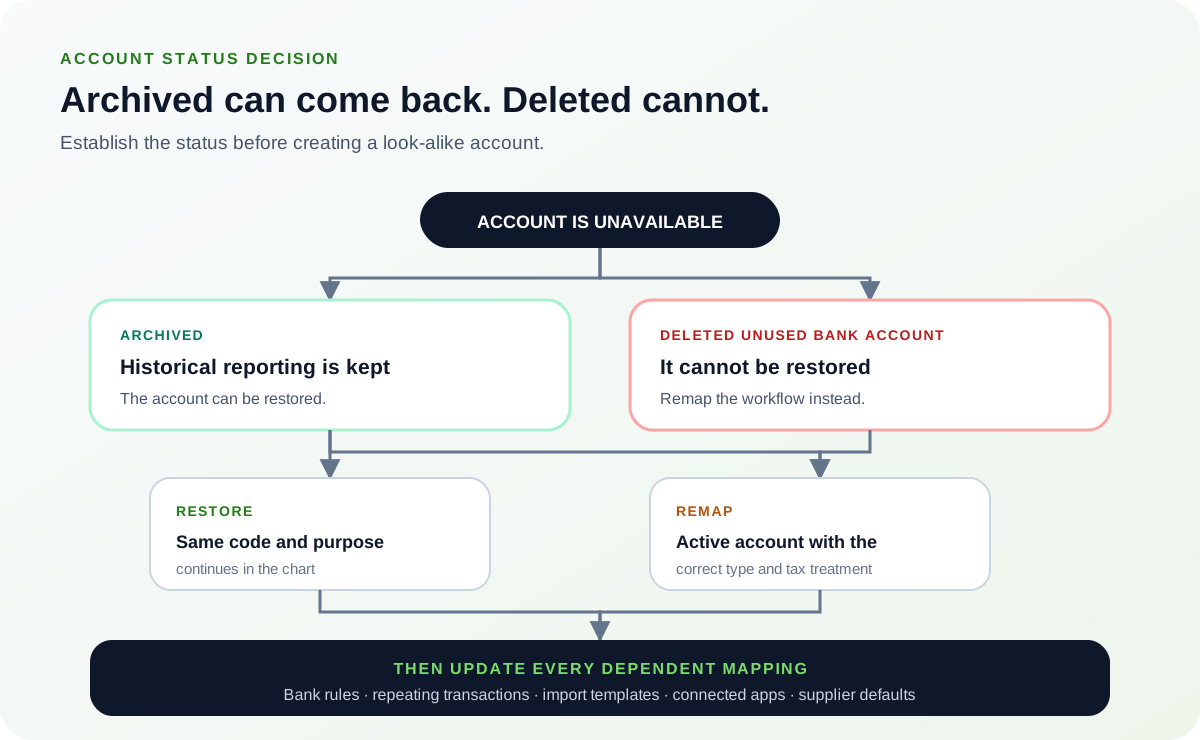
Establish the status first: creating a look-alike account before checking the archived list is what leaves two accounts serving one purpose. Either path still requires every dependent mapping to be updated.Source: Ledger Clinic original diagram - Choose restore or remap. Restore the account if the same code and accounting purpose should continue. Otherwise select an active account with the correct type and tax treatment.
- Get accountant approval before changing classification.
- Preserve the historical account rather than rewriting past transactions for convenience.
- Update every dependent mapping. Correct connected apps, import templates, bank rules, repeating entries, and supplier defaults that still point to the archived account.
- Test with one controlled transaction.
- Confirm the new account appears in the intended reports.
- Review the chart after the change. Check for duplicate codes, unintended archived accounts, and balances posted to the wrong type.
- Export the chart of accounts for review.
- Document why the account was restored or replaced.
Verify the result
A disappearing error is not enough. Confirm the accounting and workflow outcome:
- The workflow uses the intended active account.
- Historical reports still contain the old activity.
- No duplicate or near-duplicate account was created accidentally.
What to avoid
- Creating a new account with the same purpose without checking the archived list.
- Bulk-importing a chart that omits accounts you intend to retain.
- Changing account type or tax treatment without accounting review.
When to involve product support, IT, or your accountant
Stop making changes and escalate when any of these conditions applies:
- The account is locked or used by a filed period.
- Importing a chart archived many existing accounts.
- You cannot determine the correct tax or report classification.
Bring the exact error, screenshots, affected record IDs, timestamps, product version or region, and a description of every change already attempted. That evidence shortens the support path and reduces repeated or conflicting fixes.
Optional free utilities
Tools that support this workflow
These run in your browser and can help prepare or inspect files. They do not replace reconciliation, source-document review, or an accountant’s approval.
Browse every free accounting toolSources checked
First-party product documentation used to verify the workflow and risk notes in this guide.