Export or back up the relevant data first. Do not delete, void, unreconcile, or adjust historical transactions unless you understand the accounting impact.
Menu names can change. We link current first-party instructions so you can confirm product behavior before acting.
Quick answer: an integration needs an accounting contract
Before connecting an app or importing a file, write down which system owns customers, suppliers, items, tax, invoices, payments, fees, refunds, inventory, payroll, and corrections. Define the direction, frequency, unique identifier, posting date, currency, tax treatment, and destination account for every flow. Without that contract, both systems may create the same transaction.
Confirm the exact Sage product and country first. Sage Accounting, Sage 50, Sage 100, Sage 300, Sage X3, Sage Intacct, and specialist products do not share one universal import layout or integration model.
Workflow map
The safe path for every Sage data flow
Keep the raw evidence, transform a copy, test a narrow batch, then reconcile the ledger result.
- 1
Scope
Name the source, destination, records, dates, owners, and system of record.
Evidence: One written data contract.
- 2
Prepare
Preserve the raw export and transform a versioned working copy.
Evidence: File hash, row count, debit/credit or signed total.
- 3
Test
Use a sandbox, copy, or small closed batch with known expected results.
Evidence: Accepted, rejected, duplicate, and correction cases.
- 4
Reconcile
Tie source totals, import log, subledger, control account, bank, tax, and exceptions.
Evidence: Signed reconciliation and rollback point.
Define the system-of-record boundary
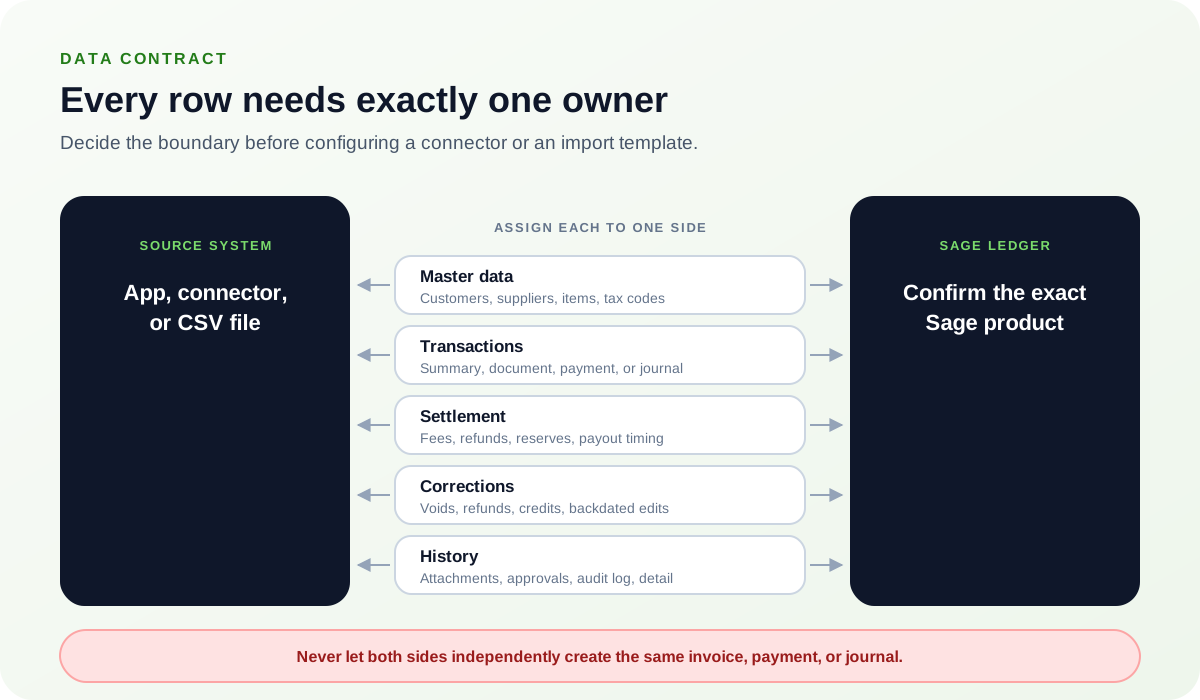
Create a matrix before configuration:
- Master data: which system creates and updates customers, suppliers, items, departments, projects, and tax codes?
- Transactions: does the source send a summary, each document, each payment, or the resulting journal?
- Settlement: are fees, refunds, reserves, tips, chargebacks, and payout timing represented separately?
- Corrections: where is a void, refund, credit, or backdated edit initiated, and how does it propagate?
- History: which system keeps attachments, approvals, audit logs, and drill-down detail?
Never let two systems independently create the same invoice, payment, or journal unless the design includes deterministic deduplication.
Choose the least complex method that preserves the required evidence
Manual or CSV batch
Useful for controlled, periodic, reviewable volumes. Requires disciplined templates, versioning, and duplicate checks.
Marketplace connector
Useful for supported recurring flows. Verify publisher, permissions, sync direction, error queue, and support ownership.
Custom integration
Useful when rules are unique or volumes are high. Requires API lifecycle, authentication, monitoring, idempotency, and change control.
Do not choose an API merely because it is automated. A reviewed batch may be safer when volume is modest and the mapping changes frequently.
Map fields and test accounting outcomes
Build a field map that includes source field, target field, type, required status, transformation, default, validation, example, and owner. Test positive and negative amounts, credits, zero values, leap dates, regional date formats, tax-inclusive and tax-exclusive lines, multiple currencies, duplicate identifiers, long descriptions, missing references, and unsupported characters.
The expected result is not just “rows imported.” State which ledger accounts, customer or supplier balances, tax reports, inventory records, project totals, and bank-reconciliation items should change.
Reconcile every run from source to financial statements
- Count source records and total monetary fields by currency, date, and transaction type.
- Retain the transformed file and the importer or connector result log.
- Separate accepted, rejected, skipped, updated, and duplicate records.
- Tie posted documents to subledger totals and the related general-ledger control account.
- Reconcile settlements to bank statement lines, including fees, refunds, timing, and reserves.
- Review tax, inventory, project, department, and currency results where applicable.
- Have a second person sign off before scheduling or widening the integration.
Use a failure playbook instead of rerunning blindly
If a batch or sync fails, stop retries until you know whether the first attempt posted anything. Capture the time zone, batch or sync identifier, exact message, application versions, source count and total, destination count and total, rejected rows, and the last successful run. A retry without an idempotent key can turn a partial failure into duplicates.
Restore only when you understand what the restore will replace and how other users or connected systems were affected. For a cloud product, reversal and controlled correction may be safer than attempting to recreate a prior state. Escalate proprietary database errors, unsupported versions, tax filings, payroll, inventory valuation, and multi-entity failures to the appropriate Sage or implementation specialist.
Optional free utilities
Tools that support this workflow
These run in your browser and can help prepare or inspect files. They do not replace reconciliation, source-document review, or an accountant’s approval.
Sources checked
First-party product documentation used to verify the workflow and risk notes in this guide.