Export or back up the relevant data first. Do not delete, void, unreconcile, or adjust historical transactions unless you understand the accounting impact.
Menu names can change. We link current first-party instructions so you can confirm product behavior before acting.
Quick answer: connected does not mean controlled
A Xero integration should have one business owner, one technical owner, least-privilege access, a written data contract, a tested exception path, daily monitoring, periodic reconciliation, and a disconnect plan. Xero notes that app billing and support may remain with the provider, and disconnecting the app does not necessarily cancel that external subscription or remove data already shared.
Workflow map
The connected-app control loop
Approve the business need, constrain the connection, prove its accounting, and keep an exit route.
- 1
Approve
Document the problem, owner, vendor, terms, data locations, security review, and expected benefit.
Evidence: Signed app decision record.
- 2
Constrain
Choose the correct organisation, minimum role, sync direction, records, dates, accounts, and tax.
Evidence: Data contract and permission record.
- 3
Prove
Test normal, duplicate, refund, error, edit, and disconnect scenarios with fictional data.
Evidence: Source-to-ledger reconciliation.
- 4
Operate
Monitor exceptions, reconcile totals, review access, update mappings, and rehearse exit.
Evidence: Named cadence and retained evidence.
Evaluate the app and operating model
- Fit: exact records, countries, currencies, tax models, volumes, historical depth, and correction workflows supported.
- Control: approvals, role model, audit history, duplicate prevention, locking, and exception visibility.
- Security: permissions requested, data retained, subprocessors, authentication, incident process, and offboarding.
- Reliability: sync frequency, latency, retry behavior, rate limits, status page, monitoring, and support ownership.
- Exit: export format, retained records, revocation, subscription cancellation, and replacement plan.
Trial the app in a Xero demo or controlled test organisation when possible. Never connect an unknown app to live payroll, bank, customer, or tax data merely to inspect its interface.
Write a transaction-level data contract
For each flow, define the source system, destination, record type, unique key, status that triggers transfer, date and time zone, currency, tax treatment, contact rule, item rule, account, tracking, payment or clearing account, attachment behavior, edit behavior, deletion behavior, and correction owner.
Ecommerce and payment integrations must explain orders, discounts, shipping, tax, tips, gift cards, refunds, chargebacks, processor fees, reserves, and payouts. CRM integrations must explain which system owns contacts and invoice status. Inventory integrations must explain item identity, quantity, cost, adjustments, and the accounting source of truth.
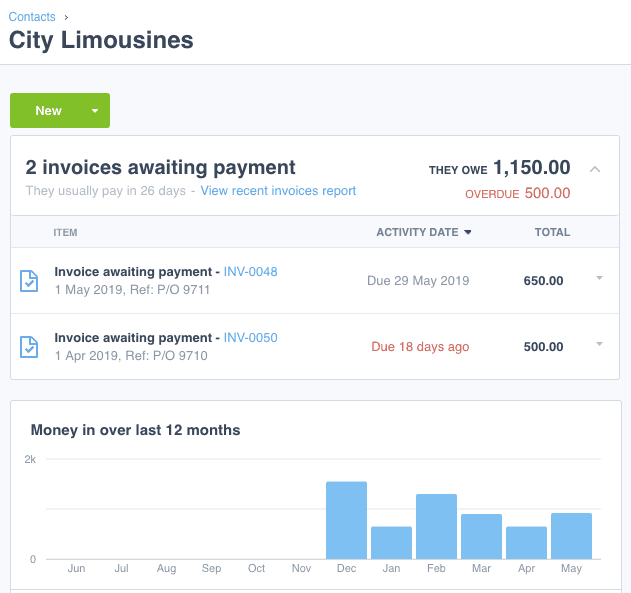
- 1The contact is the master record. Decide which system owns it and what an integration matches on, or a small naming difference creates a second contact.
- 2Owed and overdue totals are derived from the documents beneath them. No integration should write a balance directly.
- 3The invoice number is the record an integration creates. Name it as the unique key so a retry updates the document instead of duplicating it.
- 4The reference carries the source system identifier — here a purchase order. This is the field that makes a later reconciliation possible.
- 5Due dates drive the ageing. Fix the date and time zone the source sends, or the same invoice ages differently in each system.
Test more than the happy path
Use fictional records to test:
- a normal sale, bill, payment, expense, or other supported transaction;
- tax inclusive and exclusive, zero-rated or exempt, multiple rates, and rounding;
- discount, refund, partial refund, chargeback, fee, reserve, and net payout;
- new and existing contacts or items with small naming differences;
- duplicate source identifiers, a retry after timeout, and a partially failed batch;
- backdated edit, void, credit, deletion, closed period, and changed mapping;
- expired authentication, removed user, revoked access, and disconnection.
Inspect transaction history in Xero; official guidance says imported app transactions may show as system generated and identify the originating app.
Reconcile source, connector, Xero, and bank
- Count and total source transactions by type, date, currency, and status.
- Compare connector accepted, rejected, skipped, updated, and pending records.
- Tie created Xero documents to subledger and general-ledger control totals.
- Reconcile settlements, fees, refunds, and timing through the clearing account to the bank.
- Review tax, tracking, project, item, and currency results.
- Investigate old exceptions and mapping changes before the reporting period is locked.
Disconnect and replace an app without losing the audit trail
Stop new source activity or establish a precise cutoff. Export source, app, exception, mapping, and reconciliation evidence. Finish or account for pending queues. Revoke the Xero connection, separately cancel the provider subscription where required, rotate credentials or keys, remove unneeded users, and verify that no new transactions arrive. Preserve the data-retention and deletion response from the provider.
Use provider documentation for the final configuration
Searches for Shopify, Stripe, Square, WooCommerce, HubSpot, Salesforce, PayPal, Gusto, Dext, Hubdoc, Power BI, Google Sheets, inventory, time, expense, or reporting integrations share the control framework above. But field availability, sync direction, pricing, regional features, and support ownership change. Use the current Xero App Store listing and the provider's official documentation for the exact connection; Ledger Clinic should not impersonate a third-party setup or login page.
Optional free utilities
Tools that support this workflow
These run in your browser and can help prepare or inspect files. They do not replace reconciliation, source-document review, or an accountant’s approval.
Sources checked
First-party product documentation used to verify the workflow and risk notes in this guide.