Export or back up the relevant data first. Do not delete, void, unreconcile, or adjust historical transactions unless you understand the accounting impact.
Menu names can change. We link current first-party instructions so you can confirm product behavior before acting.
Quick answer: set the accounting boundary before importing activity
Create the correct Xero organisation for the correct legal entity and country, choose the conversion date with your accountant, configure financial and tax settings, review the chart of accounts, add users with the minimum required role, enter reconciled opening balances, and only then connect bank feeds or import statement history.
Xero can support a small business, sole trader, nonprofit, property operation, freelancer, or professional practice, but the tracking and control design differs. Do not solve entity, fund, trust, property, or client-money accounting by mixing legally separate activity inside one undifferentiated organisation.
Workflow map
The first trustworthy month in Xero
Each gate supplies evidence for the next. Do not connect automation before the opening position is controlled.
- 1
Define
Confirm entity, country, tax basis, financial year, base currency, conversion date, and users.
Evidence: Approved setup worksheet.
- 2
Structure
Review accounts, tracking, contacts, items, tax rates, and document numbering.
Evidence: Accountant-reviewed master-data list.
- 3
Open
Enter opening balances and open receivables/payables at the same cutover point.
Evidence: Source close equals Xero opening.
- 4
Operate
Connect feeds, enter documents, reconcile, review reports, and lock the period.
Evidence: Bank, subledger, tax, and trial-balance tie-outs.
Collect the setup evidence first
- legal name, addresses, registration and tax identifiers, filing basis, financial year, and base currency;
- final trial balance at the conversion date plus bank, receivable, payable, tax, inventory, loan, asset, and equity reconciliations;
- open customer invoices, supplier bills, credits, deposits, checks, and uncleared bank items;
- approved account, tax-rate, tracking, contact, item, user, and integration lists;
- source exports and a recoverable archive from the previous system.
Choose a conversion date at a clean reporting boundary when possible. If history is imported, decide which details are transactional evidence and which are reference-only archives. Never imply that an opening-balance conversion preserves a complete historical audit trail.
Configure the organisation, financial settings, tax, and users
Xero notes that an organisation's tax country cannot simply be changed after creation, so verify it before activity begins. Review the legal identity, financial year end, reporting basis, base currency, tax registration, default tax behavior, invoice settings, contact defaults, and document numbering. Ask the responsible tax professional to approve choices that affect returns.
Add named users rather than sharing credentials. Separate day-to-day entry, approval, payroll, payment, reporting, and administration privileges where the team permits it. Review access at least quarterly and immediately when responsibilities change.
Review the chart of accounts and opening balances together
Xero uses account type to place balances in financial reports, and some system accounts have special behavior. Keep the chart compact enough to use consistently. Use tracking or another supported dimension for reporting needs that are not separate general-ledger accounts. Avoid creating a new account for every customer, supplier, project, or payment method.
Tie the opening trial balance to the final source trial balance. Then reconcile receivables and payables to their open documents, every bank and card to its statement, tax to the last filed or prepared return, loans to lender statements, inventory to the approved valuation, and fixed assets to the register. Investigate differences; do not bury them in a suspense account without an owner and resolution date.
Connect bank feeds without creating an overlap
Record the last statement line already present, the first line expected from the feed, and any manually imported period. Xero explains that feeds bring statement lines into the organisation ready for reconciliation; the feed does not replace the accounting decision to match an existing document or create and categorise a new transaction.
Build bank rules gradually from repeated, unambiguous examples. Review payee, description, amount direction, tax, account, tracking, and transfer behavior. A broad rule can consistently post the wrong accounting faster than manual entry.
Use a daily, weekly, and month-end bookkeeping routine
Daily
Enter source documents, review sync exceptions, match clear statement lines, and resolve rejected transactions.
Weekly
Review aged items, uncoded activity, clearing accounts, duplicate contacts, unapplied payments, and overdue approvals.
Month-end
Reconcile controls, post supported adjustments, review financial statements, publish evidence, and lock the period.
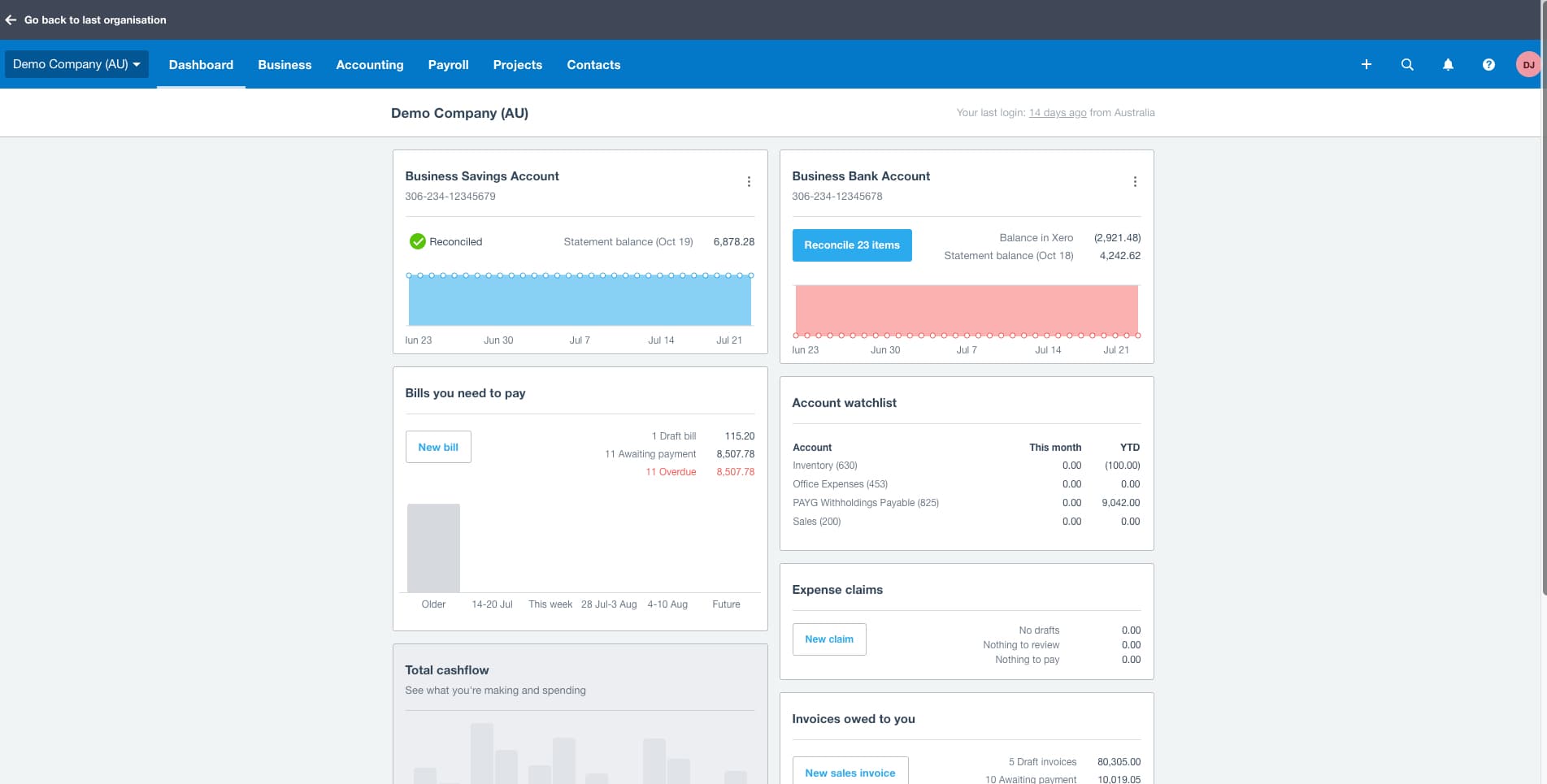
- 1The reconcile count is the queue of statement lines waiting for an accounting decision. A high count is unfinished work, not an error.
- 2Balance in Xero and the statement balance are shown side by side and are dated differently here. Compare them at the same date before treating either as correct.
- 3Overdue bills belong in the weekly review: confirm each one is genuinely unpaid rather than paid outside Xero and never matched.
- 4The account watchlist tracks chosen accounts month to date and year to date. Use it to spot accounts that should be moving and are not.
- 5Invoices owed to you splits drafts from awaiting payment. A draft has not been sent, so it is not yet a receivable anyone can chase.
Verify more than the dashboard
- bank and credit-card statement balances agree at the same date;
- aged receivables and payables agree with their control accounts;
- tax, payroll, inventory, loans, fixed assets, and clearing accounts reconcile where used;
- profit and loss, balance sheet, cash flow, and trial balance use the intended date and basis;
- unexpected negative, old, uncoded, duplicate, or suspense balances have assigned follow-up;
- the period is published or otherwise preserved and locked according to policy.
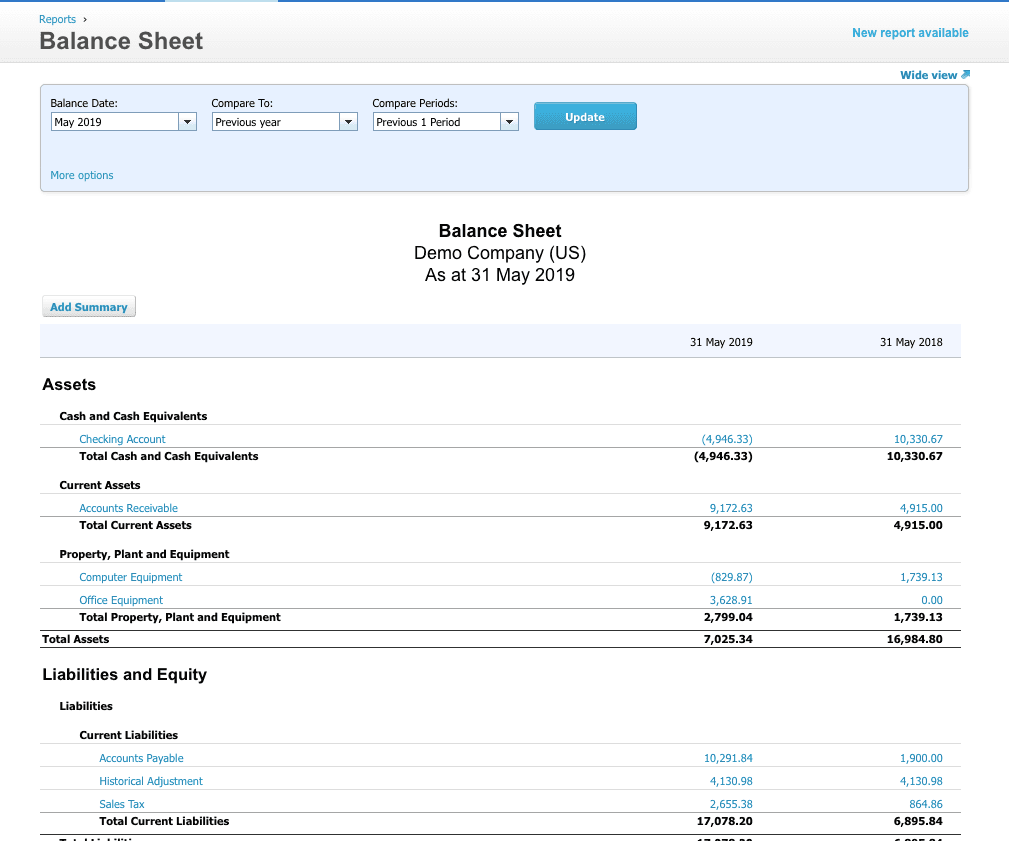
- 1The balance date decides what the report answers. Set it to the period you reconciled, not to today.
- 2Compare To and Compare Periods define the second column. A comparison against the wrong period invents variances that do not exist.
- 3The report header repeats the organisation and the as-at date. Check it before circulating a PDF that will outlive the screen it came from.
- 4A bank account in brackets is negative. Investigate it against the reconciled statement balance instead of assuming an overdraft.
- 5Accounts receivable here must agree with the aged receivables report at the same date; a difference means the subledger and the control account have parted company.
Optional free utilities
Tools that support this workflow
These run in your browser and can help prepare or inspect files. They do not replace reconciliation, source-document review, or an accountant’s approval.
Sources checked
First-party product documentation used to verify the workflow and risk notes in this guide.