Export or back up the relevant data first. Do not delete, void, unreconcile, or adjust historical transactions unless you understand the accounting impact.
Menu names can change. We link current first-party instructions so you can confirm product behavior before acting.
Quick answer: profit needs complete time, cost, revenue, and status
Xero Projects can bring tasks, estimated and actual expenses, time, quotes, invoices, and project reports together. But profitability is only meaningful when staff cost rates are controlled, every relevant time and cost reaches the correct project, invoice lines remain linked, and users understand which project entries do—and do not—post to the accounting ledger.
Workflow map
Estimate → capture → invoice → prove
Keep operational project measures connected to, but distinct from, the accounting ledger.
- 1
Estimate
Define scope, tasks, hours, rates, expenses, markup, quote, and acceptance.
Evidence: Approved baseline and change process.
- 2
Capture
Record staff time and actual project expenses promptly to the correct task and project.
Evidence: Missing-time and unassigned-cost review.
- 3
Invoice
Bill deposits, tasks and expenses, project amounts, or accepted quotes deliberately.
Evidence: Invoice lines link to the intended project.
- 4
Prove
Compare estimate, cost, charge, invoiced, ledger, and bank evidence before closure.
Evidence: Project report and financial statements reconcile.
Design the project before activity begins
- use one naming convention that includes customer, engagement, location, or contract identifier;
- break work into tasks that support estimating, time capture, billing, and variance analysis;
- define charge type, expected hours, expected external costs, markup, and billing method;
- decide which users can see or edit staff cost rates and project financials;
- set a rule for change orders, non-billable work, deposits, write-downs, and project closure.
Do not create a project for every invoice if the business needs profitability across a longer engagement. Do not combine unrelated jobs if managers need separate cost and margin accountability.
Separate staff cost rate from customer charge rate
The staff cost rate estimates what the business incurs for an hour of work; the task charge rate supports what the customer may be billed. They answer different questions. Define whether cost includes wages only or a controlled burden for taxes, benefits, and overhead. Document the effective date and approval for changes so prior profitability is interpretable.
Restrict access to sensitive cost data. Xero's Projects roles distinguish users who can edit cost rates and see full profitability from more limited project users. Test each role with a fictional project before onboarding staff.
Capture time and expenses at the source
Require users to select the correct project and task, record a useful description, and submit time frequently. Review missing, overlapping, unusually long, non-billable, or backdated entries. For expenses, preserve the supplier evidence, tax, account, project, markup, reimbursable status, and approval.
Xero distinguishes estimated expenses from actual expenses and allows supported bills, spend-money transactions, and staff expenses to be assigned to projects. Verify both the project view and the underlying accounting transaction; an operational estimate alone does not create a ledger cost.
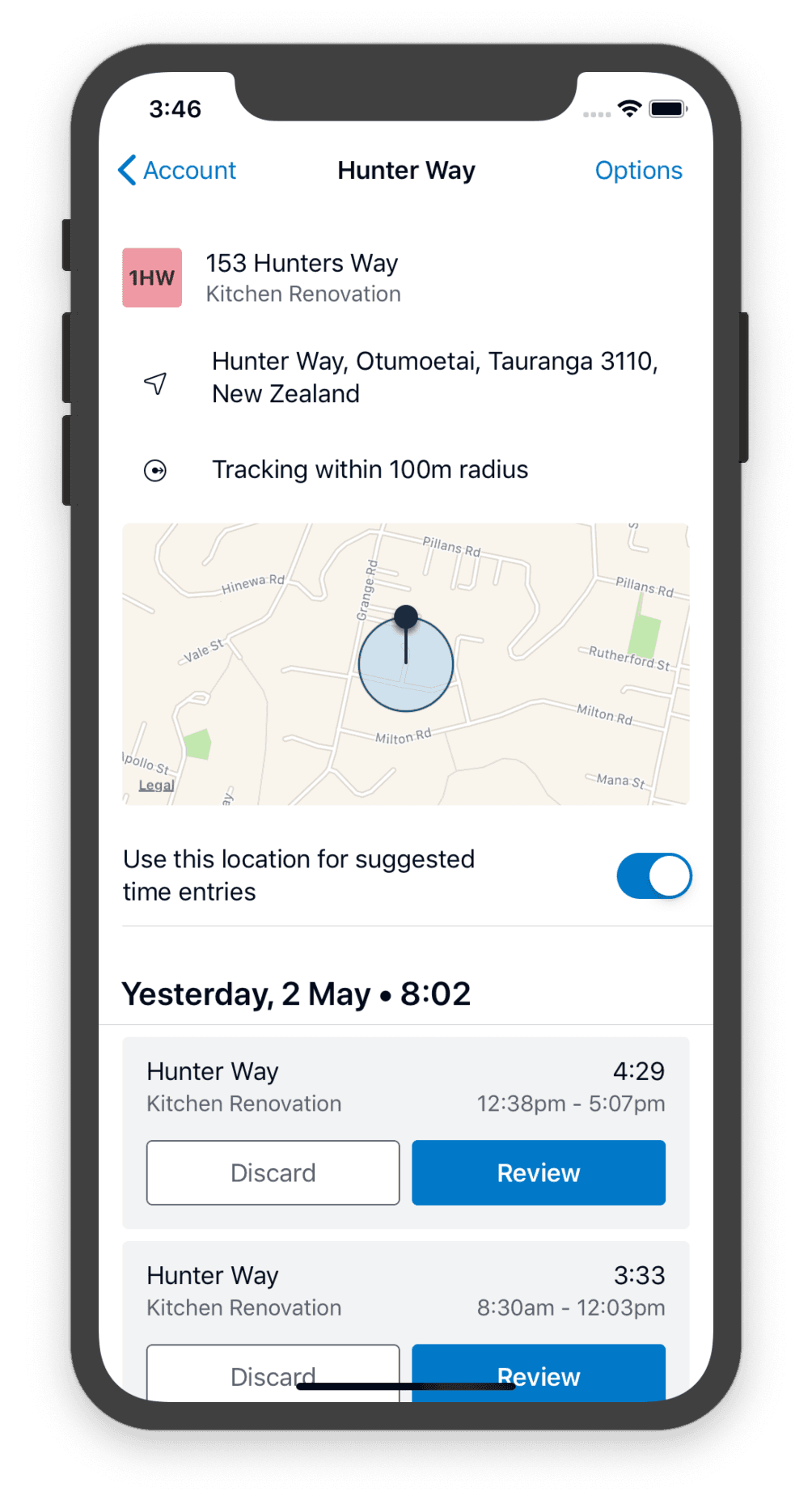
- 1The tracking radius is the rule that generates suggestions. Presence inside it is not proof that project work was performed.
- 2Suggested time entries are switched on per location. Agree with staff how the setting is used before enabling it on their devices.
- 3Each suggestion carries a project and task. Confirm both — a site can host more than one job, and the wrong task distorts task-level variance.
- 4The duration is elapsed time between arrival and departure. Travel, breaks, and non-billable work still have to be taken out.
- 5Nothing becomes a time entry until it is reviewed or discarded. Clear this queue on a set cadence so entries are not backdated weeks later.
Choose the project invoice method deliberately
Xero documents deposit, tasks-and-expenses, project-amount, and accepted-quote invoice paths. Select the method that matches the contract. When assigning existing invoice lines to a project, confirm every relevant line is linked; adding a new line later may require a separate project assignment.
Keep billable, invoiced, and paid separate. An item can be chargeable but not yet invoiced, invoiced but unpaid, or paid through a settlement that still has to be reconciled to the bank.
Read project profitability with the date model in mind
Xero's Project Details guidance explains that cost, charge, and invoiced activity can occur on different dates. Set the report period to the question you are answering, and compare project reports with the general ledger, time approvals, supplier documents, customer invoices, and bank evidence. Investigate missing or unexpectedly negative margins by component.
Use the project report for project operations and financial reports for the accounting result. Do not assume every operational measure automatically appears in the balance sheet or profit and loss.
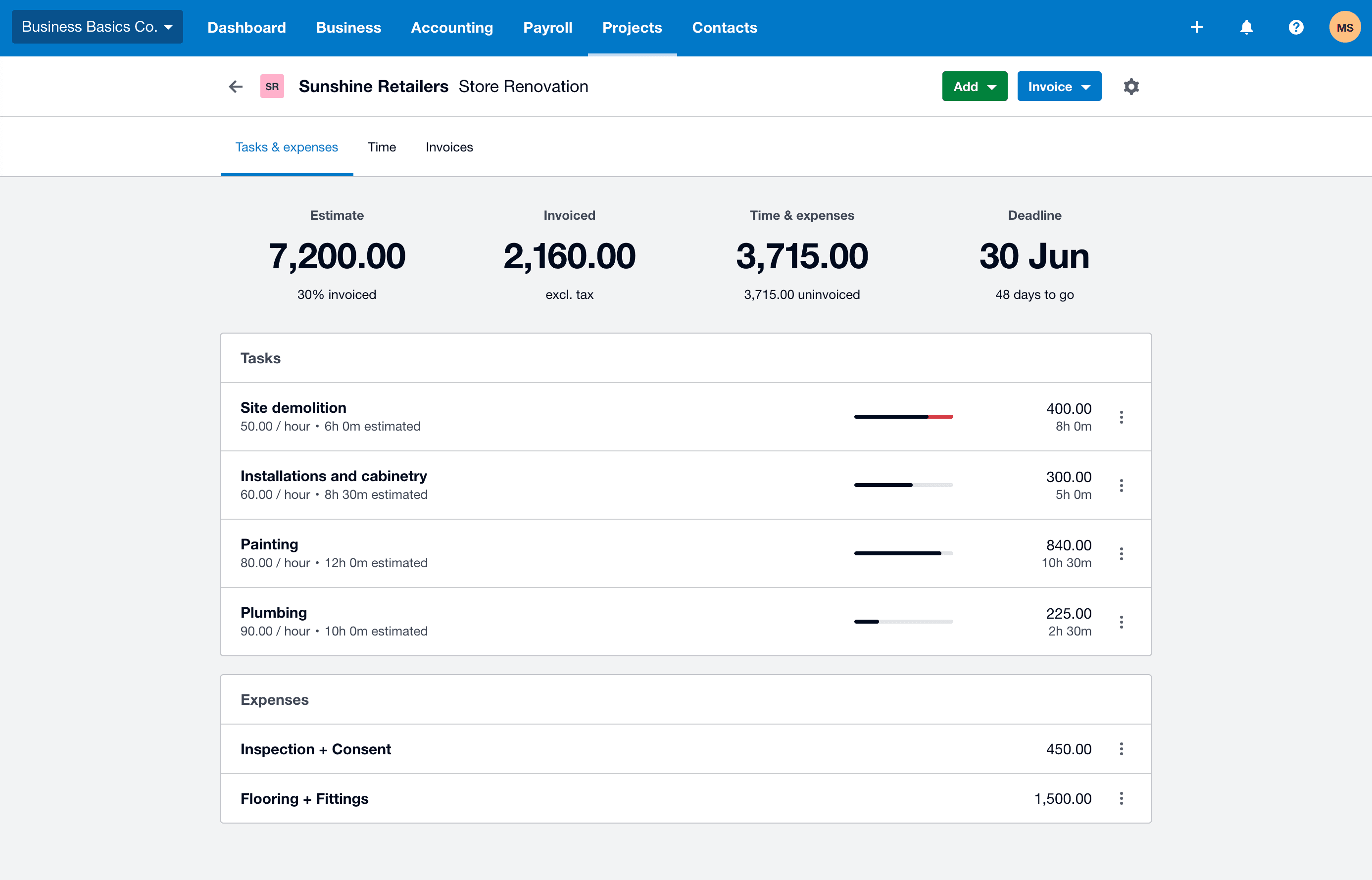
- 1The estimate is the approved baseline with the invoiced percentage beneath it. It is an operational figure and posts nothing to the ledger.
- 2Invoiced is stated excluding tax. Agree it to the customer invoices actually posted before treating it as revenue.
- 3Time and expenses captured, all of it still uninvoiced here. Uninvoiced work is the gap between activity and billing, and it is where margin quietly disappears.
- 4The task bar turns red once actual hours pass the estimate. Investigate the overrun at task level rather than at the project total.
Close a project only after the completion checklist
- all approved time and expenses are entered and assigned;
- change orders, credits, write-downs, deposits, and final invoice are recorded;
- supplier bills and customer invoices are posted in the intended period;
- unbilled, work-in-progress, clearing, and deferred balances are reviewed;
- project reports reconcile to the supporting ledger and source documents;
- the final margin variance is explained and the project owner approves closure.
Optional free utilities
Tools that support this workflow
These run in your browser and can help prepare or inspect files. They do not replace reconciliation, source-document review, or an accountant’s approval.
Sources checked
First-party product documentation used to verify the workflow and risk notes in this guide.
- About Xero ProjectsXero Central · Checked August 2026
- Add time to a projectXero Central · Checked August 2026
- Invoicing in Xero Projects explainedXero Central · Checked August 2026
- Project Details reportXero Central · Checked August 2026
- Xero Projects roles and permissionsXero Central · Checked August 2026