Export or back up the relevant data first. Do not delete, void, unreconcile, or adjust historical transactions unless you understand the accounting impact.
Menu names can change. We link current first-party instructions so you can confirm product behavior before acting.
Quick answer: separate four pieces of evidence
The invoice proves what you billed, its status records where the document is in the workflow, the payment record applies money to the receivable, and the bank statement proves the settlement that actually reached the account. Keep those links intact. Do not mark an invoice paid merely because a processor dashboard says successful, and do not create a second payment when the bank feed arrives.
Workflow map
Invoice → payment → settlement → reconciliation
Follow one chain of evidence from the customer document to the bank.
- 1
Invoice
Correct contact, dates, line detail, revenue, tax, currency, terms, and approval.
Evidence: Approved invoice and delivery evidence.
- 2
Payment
Apply the actual amount and date to the correct invoice or customer.
Evidence: Invoice balance and payment reference.
- 3
Settlement
Separate gross receipts, fees, refunds, chargebacks, and timing when a processor is used.
Evidence: Processor payout report.
- 4
Reconcile
Match the bank statement line to the existing payment or clearing-account transfer.
Evidence: Bank difference zero; no duplicate receipt.
Set up the sales workflow before sending the first invoice
- confirm legal identity, tax registration, base currency, financial year, and invoice numbering;
- review contact names, billing emails, payment terms, tax defaults, items, revenue accounts, tracking, and branding themes;
- decide who may draft, approve, send, credit, write off, and record payments;
- configure email templates and payment services with approved wording, fees, settlement accounts, and customer support ownership;
- send test invoices to addresses your team controls and test desktop, mobile, PDF, online view, and payment behavior.
Create, approve, and send the right document
Xero's current invoice workflow can save a document as draft or submit it for approval. Before approval, check the customer, invoice and due dates, currency, description, quantity, unit price, discounts, account, tax, tracking, reference, attachments, and totals. A copied invoice can inherit defaults that have changed, so review every copied field.
Delivery status does not prove inbox placement or customer acceptance. Preserve the sent address and time, then use the online invoice or share link where appropriate. If delivery fails, follow the dedicated diagnostic path rather than repeatedly resending to an unverified address.
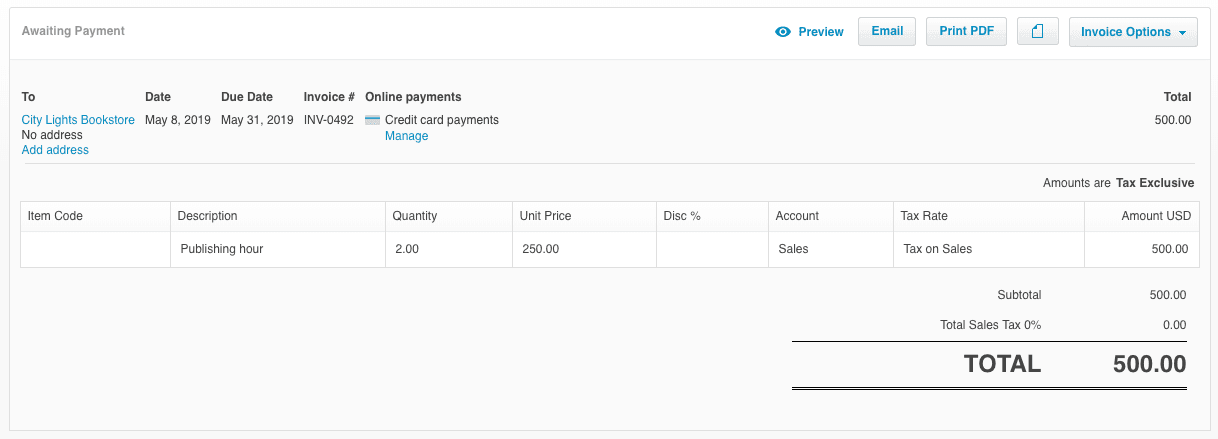
- 1Awaiting Payment is a document status. It says the invoice was approved, not that it was delivered or read.
- 2This customer has no address on file. Confirm the billing contact and email before sending, since delivery failures start here.
- 3Invoice date, due date, and invoice number sit together. The due date sets the ageing and the number is what a customer will quote when they pay.
- 4Amounts are tax exclusive on this invoice. The setting changes what every line and the total mean, so verify it before comparing to a quote.
- 5The total is the amount a payment must clear. Part payments leave a balance; do not close the invoice until that balance is zero or credited.
Record payment only when the evidence supports it
Apply a full or part payment to the correct approved invoice, using the actual payment date, amount, currency, destination bank or clearing account, and reference. Xero's official workflow then exposes the payment transaction in the selected bank account for later reconciliation.
If a bank statement line already suggests a match to the invoice or payment, review and accept the match instead of creating a second receipt. For a combined deposit, use a supported batch or clearing workflow so individual customer balances and the single bank settlement both remain explainable.
Reconcile online payments at gross, fee, refund, and payout level
A payment service can add a pay action to an online invoice or statement. The processor may settle several customer payments together, net its fee, delay part of a payout, or include refunds and chargebacks. Use a processor clearing account when the bank deposit cannot directly match one customer payment.
- record or sync the gross customer payment against the invoice;
- record processor fees, refunds, reserves, and chargebacks to approved accounts;
- transfer the net settlement from the clearing account to the bank;
- match the bank statement line to that transfer;
- reconcile the clearing account to the provider's payout report.
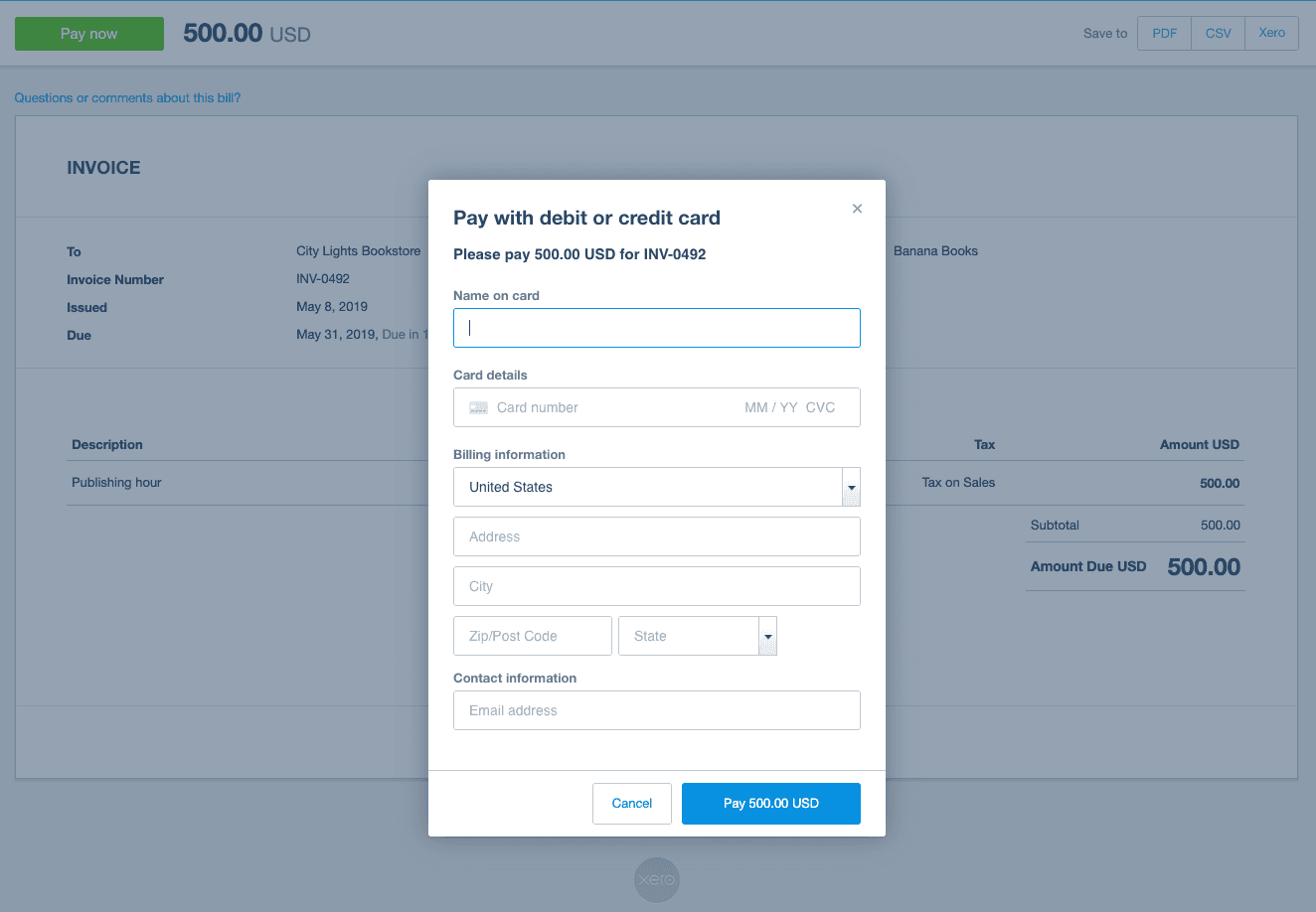
- 1The pay action appears because a payment service is connected to the organisation, not because this invoice was configured individually.
- 2The panel names the invoice being paid. That reference is what links the processor record back to the receivable.
- 3The amount due on the invoice is the gross figure. Post it against the invoice and record the processor fee separately.
- 4A successful payment here is a processor authorisation. The bank deposit that follows may be net, batched, or delayed, so reconcile through a clearing account.
Handle credits, overpayments, bad debt, and wrong payments deliberately
- Wrong customer or invoice: remove or reverse the incorrect application using the supported workflow, then reapply it with evidence.
- Overpayment or prepayment: keep the customer credit visible rather than forcing the invoice total to match.
- Refund: link the refund to the customer credit or payment trail and reconcile the outgoing bank line.
- Credit note: use it when the commercial value changes; do not edit historical revenue merely to clear a balance.
- Bad debt: obtain accounting and tax approval and use the supported write-off treatment.
- Duplicate payment: prove whether both the receivable and bank were affected before deleting anything.
Month-end invoice and payment checks
- aged receivables agree to the accounts-receivable control account;
- draft, awaiting-approval, overdue, credited, and written-off items have owners;
- customer deposits, unapplied receipts, and negative balances are understood;
- processor clearing accounts reconcile to payout reports and unsettled items;
- bank deposits agree to statement lines without duplicate receipts;
- tax, currency gains or losses, and cutoff are reviewed before the period is locked.
Optional free utilities
Tools that support this workflow
These run in your browser and can help prepare or inspect files. They do not replace reconciliation, source-document review, or an accountant’s approval.
Sources checked
First-party product documentation used to verify the workflow and risk notes in this guide.