Export or back up the relevant data first. Do not delete, void, unreconcile, or adjust historical transactions unless you understand the accounting impact.
Menu names can change. We link current first-party instructions so you can confirm product behavior before acting.
Identify the failure before applying a fix
The balance in Xero, statement balance, or actual bank balance does not agree for the same reporting date.
Record the complete message, affected organisation or company, user, date range, and last successful action. A precise symptom is more useful than trying several broad repairs at once.
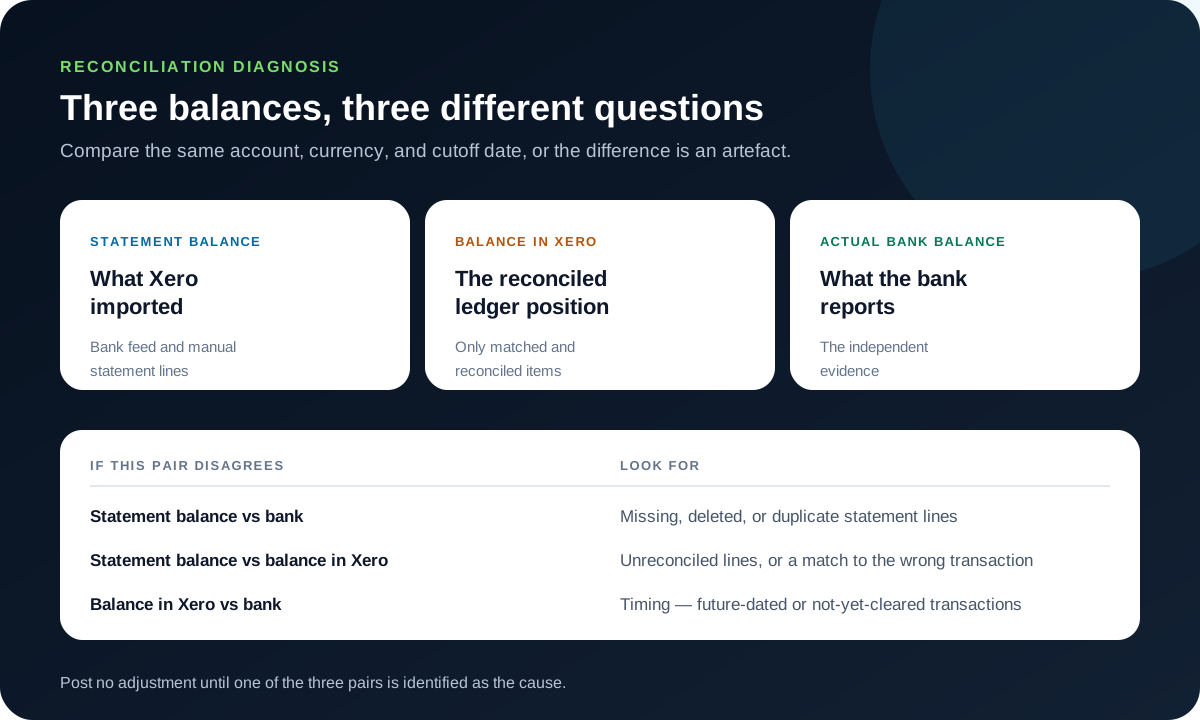
Checks before changing data
- Use the same account, currency, and cutoff date for all three balances.
- Refresh the feed and confirm all cleared bank lines have arrived.
- Check whether the difference is temporary because of future-dated transactions.
Resolution path
- Validate the statement balance first. Compare Xero’s statement balance to the bank’s balance for the same date. If these differ, investigate the imported statement before editing accounting entries.
- Look for missing, deleted, or duplicate statement lines.
- Confirm the opening and closing dates.
- Run the Bank Reconciliation report pack. Use the Summary, Bank Statement, and Statement Exceptions reports to identify where the calculation diverges.
- Enter the bank’s ending balance for the report date.
- Open individual exceptions rather than posting an unexplained adjustment.
- Correct the specific cause. Import missing lines, remove confirmed duplicates, or unreconcile a wrong match. Preserve valid invoice and bill payments.
- Use remove and redo only when the created account transaction itself is wrong.
- Use unreconcile when the transaction is valid but matched to the wrong line.
- Reconcile and document the period. When the balances agree, complete the period and retain the reports used for the review.
- Verify all lines through the cutoff are reconciled.
- Record any accountant-approved timing item.
Verify the result
A disappearing error is not enough. Confirm the accounting and workflow outcome:
- All balances agree for the same date or have a documented timing explanation.
- Statement Exceptions contains no unexplained item.
- No plug transaction was posted solely to make the difference zero.
What to avoid
- Posting an unexplained suspense entry before tracing the difference.
- Deleting a transaction merely because a similar statement line exists.
- Comparing balances from different dates.
When to involve product support, IT, or your accountant
Stop making changes and escalate when any of these conditions applies:
- The period is closed or included in filed tax reports.
- A foreign-currency difference is unclear.
- The bank feed itself is missing or duplicating lines repeatedly.
Bring the exact error, screenshots, affected record IDs, timestamps, product version or region, and a description of every change already attempted. That evidence shortens the support path and reduces repeated or conflicting fixes.
Optional free utilities
Tools that support this workflow
These run in your browser and can help prepare or inspect files. They do not replace reconciliation, source-document review, or an accountant’s approval.
Sources checked
First-party product documentation used to verify the workflow and risk notes in this guide.