Export or back up the relevant data first. Do not delete, void, unreconcile, or adjust historical transactions unless you understand the accounting impact.
Menu names can change. We link current first-party instructions so you can confirm product behavior before acting.
Quick answer
Intuit currently documents budgeting for QuickBooks Online Plus and Advanced. Start with closed, reliable actuals and a written set of operational assumptions. Build monthly income and expense targets in the same account and tracking structure used by management reports, then review budget versus actual after every month-end close.
A budget is useful only when each material variance has an explanation, an owner, and a decision. Copying last year into QuickBooks and never reviewing it creates a report, not a planning process.
Workflow map
Assumptions → baseline → actuals → forecast
Keep the approved budget stable enough for accountability while updating the forecast as new evidence changes expectations.
- 1
Assume
Document volume, price, timing, staffing, cost, capital, financing, tax, and cash assumptions.
Evidence: Named owner and source for each material driver.
- 2
Baseline
Build or import the monthly account-level budget and verify every total and dimension.
Evidence: Approved version and import control totals.
- 3
Compare
Run budget versus actual on the same basis, period, accounts, and class or location view.
Evidence: Material variances have explanations and owners.
- 4
Forecast
Update expected outcomes without silently rewriting the original approved budget.
Evidence: Version, date, assumptions, and decision trail retained.
Complete the prerequisites before entering numbers
- The subscription supports budgeting and the dimensions needed for the plan.
- The chart of accounts is approved, consistently used, and free from unnecessary duplicates.
- Historical periods used as a baseline are reconciled and closed.
- Management agrees on cash or accrual basis for the budget comparison.
- Classes, locations, customers, or other dimensions used for responsibility reporting are governed.
- One person owns the master assumptions, version, approval, and change log.
- The reporting calendar defines when actuals are closed and when variance review occurs.
If the account structure will change, map the old actuals to the new budget structure before importing. Otherwise the budget and actual columns can look comparable while representing different categories.
Design the budget from operating drivers
Write the assumptions before the amounts. Typical drivers include:
- Units, customers, contracts, utilization, price, discounts, refunds, and collection timing.
- Headcount, pay rates, payroll taxes, benefits, hiring dates, and contractor capacity.
- Materials, freight, merchant fees, commissions, cloud costs, and other variable costs.
- Rent, insurance, software, professional fees, debt service, and other committed costs.
- Seasonality, project start dates, renewals, grant periods, events, and known one-time activity.
- Capital purchases, loan proceeds, owner funding, taxes, and distributions that may require separate cash planning.
Build detail outside the general ledger where operational drivers require it, then summarize approved amounts into the QuickBooks budget structure. Preserve the driver model and approval evidence with the budget version.
Build the budget in QuickBooks Online
- Label the version. Name the budget with the fiscal period, basis, scope, dimension, and version.
- Set the calendar. Confirm the fiscal year and interval before entering values.
- Choose the dimension with care. Select the intended subdivision only when the class, location, customer, or other structure is complete and consistently used in actual transactions.
- Load the monthly values. Enter or import monthly values from the approved model.
- Check totals and phasing. Review annual totals and monthly phasing against the signed assumptions.
- Prove nothing is missing. Run the initial budget report and confirm every expected account and dimension appears.
- Freeze the baseline. Export or preserve the approved baseline and record the approval date.
Avoid hiding uncertainty with false precision. A monthly budget can still use documented ranges, scenarios, or contingency lines in the supporting model even if the QuickBooks report displays one approved amount.
Import a budget without losing control totals
Intuit provides a budget-import workflow for supported plans. Treat the import as a controlled data migration:
- Protect the source file. Save the approved source workbook as read-only evidence and work from a copy.
- Match the names exactly. Confirm account and dimension names match QuickBooks exactly.
- Check the shape of the data. Check fiscal-year start, month order, signs, zero values, blank values, and annual totals.
- Trial an unfamiliar structure. Use a small test budget or sample when the structure is unfamiliar.
- Write down the control totals. Record the source file name, version, row count, annual revenue, annual expense, and net budget total.
- Import once and compare. Import once, then compare the QuickBooks output to those control totals by month and account.
- Clear every exception. Investigate every rejected, missing, duplicated, or unexpectedly created line before approval.
Do not repeatedly import the same file in the hope that a discrepancy disappears. First determine whether the product replaces, merges, or duplicates values in the selected workflow and version.
Turn budget-versus-actual into a decision meeting
- Close the period first. Close and reconcile the actual period before measuring performance.
- Run the comparison report. Run the report for the approved budget, period, accounting basis, and dimension.
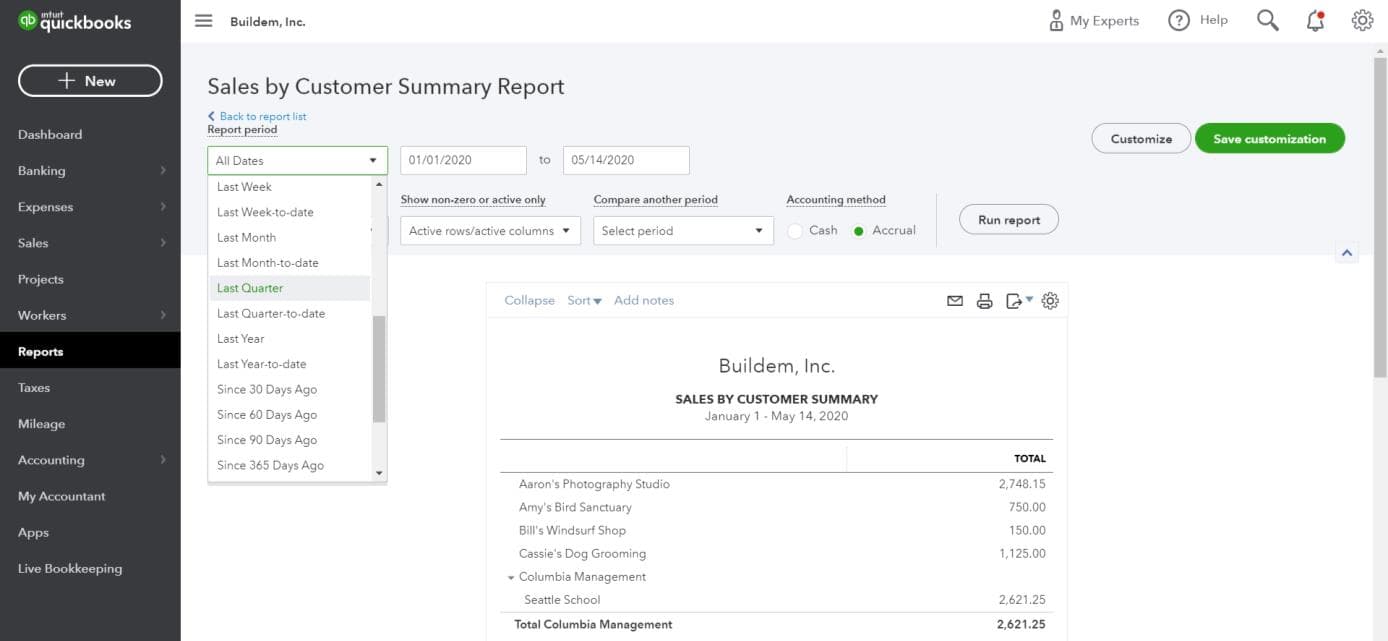
- 1The named preset is a shortcut, not the definition. Read what it resolves to before trusting it — a preset relative to today will not reproduce the same figures when the pack is reopened next month.
- 2The explicit from and to dates are what the report actually runs. They must match the period the budget was loaded against, or every variance below is measuring two different windows.
- 3Compare another period is what turns a single-column report into a comparison. Choosing the comparison here, rather than exporting and subtracting by hand, keeps both columns on one definition.
- 4Accounting method decides whether unpaid invoices and bills are in the actuals. Accrual is selected here; if the budget was built on the other basis, timing alone will manufacture variances.
- 5Nothing in this bar takes effect until Run report. A screenshot of the settings is not evidence of the numbers — retain the run output, not the panel.
- Set the materiality thresholds. Set both an amount threshold and a percentage threshold for investigation.
- Find what actually moved. Drill into actual transactions and distinguish timing, volume, price, mix, classification, and one-time effects.
- Decide which side is wrong. Confirm whether the budget assumption, actual transaction, or both are wrong.
- Give each variance an owner. Assign an owner and action for each material operational variance.
- Split fixes from decisions. Separate accounting corrections from business-response actions.
- Keep the record. Retain the report, commentary, decisions, and follow-up status with the close pack.
A favorable cost variance is not automatically good if it reflects delayed hiring, missed maintenance, missing vendor bills, or miscoded activity. An unfavorable revenue variance is not automatically a sales failure if billing or recognition timing explains it.
Keep the approved budget distinct from the latest forecast
The budget is the approved baseline. A forecast updates expectations using actual results and new information. Preserve both so management can answer two different questions:
- Budget variance: How did performance differ from the approved plan?
- Forecast variance: How has the expected year-end outcome changed since the latest forecast?
Do not overwrite the original budget every month to eliminate variances. If a formal reforecast is approved, create a clearly named version, retain the prior version, document changed assumptions, and state which report is used for accountability.
Do not confuse a Profit and Loss budget with cash flow
Profit and cash differ because of collection timing, vendor payment timing, loan principal, capital purchases, owner contributions and distributions, taxes, inventory, prepayments, deferred revenue, and other balance-sheet movements. Build a separate cash forecast when liquidity decisions matter.
Reconcile the cash forecast opening balance to the bank and forecast collections and payments by timing. A profitable annual budget can still produce a cash shortage during a growth period or seasonal low point.
QuickBooks budgeting checklist
- The plan supports the required budgeting and dimensional features.
- Historical actuals are reconciled, closed, and mapped to the budget structure.
- Assumptions, drivers, owners, and approvals are documented.
- Monthly phasing reflects seasonality and known timing.
- Imported values reconcile to source control totals.
- The approved baseline is preserved and cannot be silently overwritten.
- Budget-versus-actual reports use the correct period, basis, scope, and dimensions.
- Material variances have causes, owners, actions, and follow-up dates.
- Forecasts remain distinct from the approved budget.
- Cash planning includes material balance-sheet movements and timing.
Sources checked
First-party product documentation used to verify the workflow and risk notes in this guide.