Export or back up the relevant data first. Do not delete, void, unreconcile, or adjust historical transactions unless you understand the accounting impact.
Menu names can change. We link current first-party instructions so you can confirm product behavior before acting.
Quick answer: there is no one global Xero payroll setup
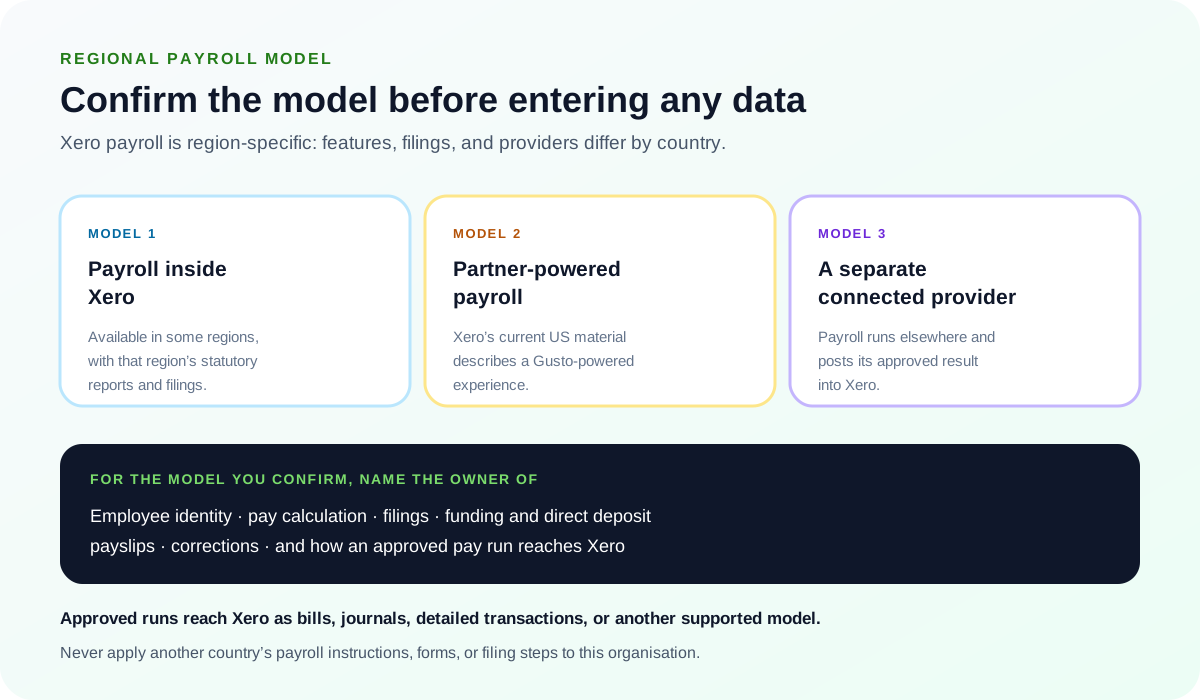
Confirm the organisation's country, legal employer, subscription, payroll provider, filing authority, bank-funding method, and current official workflow. In the United States, Xero's current official payroll material describes a Gusto-powered experience and a mapping from payroll expense and liability accounts into Xero. Other regions use different features, statutory reports, filing processes, and employee apps. Never apply P45, P60, P11D, STP, Canadian, or US instructions across borders.
Workflow map
The payroll first-run gates
Payroll is ready only when identity, calculation, funding, filing, and accounting all pass independently.
- 1
Authority
Confirm country, employer registrations, provider, filing access, bank authority, and payroll owner.
Evidence: Approved registration and access checklist.
- 2
Configuration
Set employees, pay schedules, earnings, taxes, deductions, benefits, leave, prior pay, and accounts.
Evidence: Employee-by-employee validation.
- 3
Preview
Run a controlled preview and compare gross-to-net, liabilities, cash, journal, and exceptions.
Evidence: Independent reviewer sign-off.
- 4
Close
Submit, fund, post, reconcile, preserve reports, and restrict later changes.
Evidence: Bank, liability, filing, and ledger evidence.
Identify the regional product and source of truth
Record:
- legal employer name, work locations, tax registrations, filing frequencies, and employment jurisdictions;
- the payroll product or connected provider, account owner, subscription, support channel, and service status;
- which system owns employee identity, pay items, time, leave, benefits, direct deposit, filings, and corrections;
- how approved pay runs reach Xero—as bills, journals, detailed transactions, or another supported model;
- where employees receive payslips and manage personal or bank information.
Build the setup from approved source documents
Validate employee legal name and address, taxpayer or payroll identifier, work location, hire and termination dates, employment classification, salary or hourly rate, pay schedule, earnings, overtime, deductions, benefits, leave, direct-deposit authorisation, and year-to-date history. Use a secure approved channel; never place real payroll identity or bank data in screenshots, test files, or ordinary support messages.
Use two-person review for bank changes, prior pay, tax settings, and the first live run. Test access with fictional data so employees, payroll administrators, accountants, and approvers see only what their role requires.
Map payroll to the ledger deliberately
Map gross wages, employer taxes, employee withholdings, benefits, deductions, reimbursements, payroll fees, cash, and each payable to approved accounts. Decide whether departments, locations, projects, or other dimensions should be carried into Xero. Document rounding and suspense behavior.
A payroll journal can balance while still using the wrong accounts. Compare the mapped output with the payroll register, liability reports, funding confirmation, and expected financial-statement presentation before posting the first live run.
Run a parallel or preview check before submission
- headcount and employee status agree with the approved roster;
- hours, rates, salary, overtime, commission, bonuses, and leave agree with authorised inputs;
- gross-to-net and employer cost are reasonable by employee and in total;
- taxes, deductions, benefits, and reimbursements match the configured rules;
- funding account, debit amount, debit date, pay date, and available cash are confirmed;
- the proposed Xero posting agrees to the payroll register and approved account map;
- filing and payment deadlines are known, with a named owner for each exception.
Reconcile payroll after every run and at month-end
- Tie the final payroll register to the posted payroll bill or journal.
- Tie net pay and payroll-service debits to the bank statement.
- Roll forward each payroll liability from opening balance through withholding, employer expense, payment, adjustment, and closing balance.
- Compare filing confirmations and authority balances with the ledger.
- Review rejected payments, off-cycle runs, reversals, voids, amendments, and suspense accounts.
- Preserve the approved register, journal, funding evidence, filings, payment confirmations, and reconciliation.
Escalate before changing filed or paid payroll
Contact the payroll provider for calculation, direct-deposit, service, or provider-side filing failures. Contact Xero or the app provider when the approved payroll result does not sync or posts incorrectly. Involve the payroll professional or tax adviser for registration, classification, prior pay, incorrect tax, amended returns, or filed periods. Give support the exact message, region, pay-run identifier, time and time zone, last successful run, mapping, expected result, actual result, and redacted evidence—never passwords, bank credentials, or unrestricted employee data.
Optional free utilities
Tools that support this workflow
These run in your browser and can help prepare or inspect files. They do not replace reconciliation, source-document review, or an accountant’s approval.
Sources checked
First-party product documentation used to verify the workflow and risk notes in this guide.