Export or back up the relevant data first. Do not delete, void, unreconcile, or adjust historical transactions unless you understand the accounting impact.
Menu names can change. We link current first-party instructions so you can confirm product behavior before acting.
Quick answer
QuickBooks Online can place multiple companies under the same Intuit sign-in, but Intuit currently requires a separate paid subscription for each company. Use Settings → Switch company to move between them. The convenience is shared access, not shared books: company data, users, bank connections, and ongoing list changes remain separate.
Decide the accounting boundary before creating the second company. Separate legal entities normally need separate books. Departments, programs, properties, locations, or product lines within one entity may be better handled through classes, locations, customers, projects, or another approved dimension. Confirm the design with the responsible accountant and legal or tax adviser.
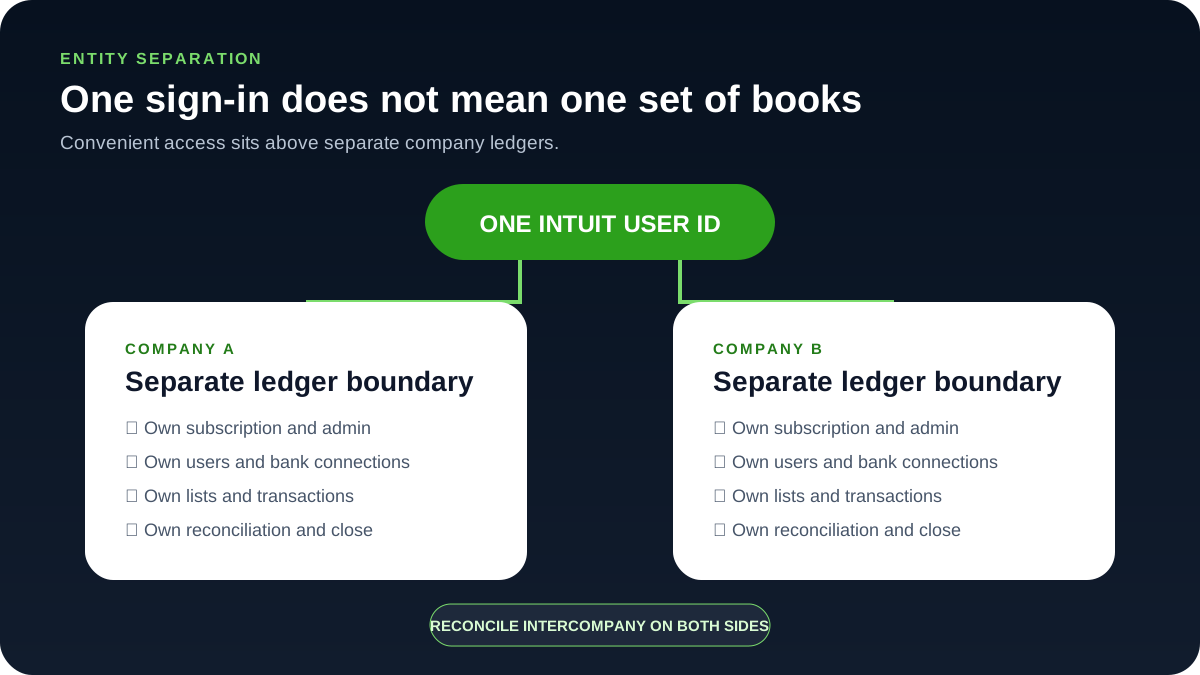
Use a separate company for the right reason
Strong reasons to separate
- Different legal entities, tax registrations, ownership groups, bank accounts, payroll registrations, or statutory filings.
- An entity-level Balance Sheet, audit trail, close process, access model, and retention policy are required.
- Transactions and cash must not be casually posted across the boundary.
- A sale, closure, financing, audit, or tax review may need a standalone set of books.
Cases that may belong inside one company
- Branches, departments, programs, or locations under the same entity.
- Projects or jobs that need profitability but not a separate balance sheet.
- Internal management reporting that can be satisfied with a governed tracking dimension.
Do not put two legal entities in one company simply to save a subscription. Intercompany balances, tax registrations, payroll, owner equity, bank reconciliations, access, and financial statements become harder to control and unwind.
Add another QuickBooks Online company under the existing sign-in
- Settle the entity facts. Confirm the legal name, tax identity, fiscal year, home currency, accounting method, plan requirements, and primary administrator for the new entity.
- Choose the plan. From the official QuickBooks Online subscription flow, select the required plan.
- Sign in with the existing ID. When prompted about adding a company to an existing account, sign in with the existing Intuit user ID.
- Create the second ledger. Create the new company and complete its setup as a separate ledger.
- Check the switcher. Use Settings → Switch company to verify both companies appear under the sign-in.
- Register the ownership. Record the subscription owner, billing method, renewal responsibility, company ID, primary admin, and recovery contact in the access register.
Do not begin importing lists or transactions until the entity design and opening-balance date are approved. A company created under the correct login can still contain the wrong records.
Standardize policies without pretending the ledgers synchronize
Create a controlled company template outside the live books:
- Account-number ranges, account types, naming rules, and prohibited duplicate accounts.
- Customer, vendor, product, service, class, location, project, and custom-field conventions.
- Month-end checklist, close calendar, materiality thresholds, report basis, and report-pack names.
- User roles, accountant access, payment approval, bank access, and administrator recovery.
- Source-document, attachment, retention, and integration policies.
- Intercompany transaction and reconciliation procedures.
The free Chart of Accounts Generator can help prototype a common structure. Treat its output as a workshop draft: each entity still needs an approved chart, opening balances, tax mappings, and report validation.
Grant and review access company by company
- Use one named user identity per person; never share the primary administrator password.
- Invite each user only to the entities needed for the role.
- Invite the accountant through the accountant-user workflow. Intuit states that accountant users invited this way do not count toward the normal subscription user limit.
- Record role, company, business purpose, approver, invitation status, and review date.
- Review active and pending invitations after staff, accountant, owner, or vendor changes.
- Test account recovery and maintain a controlled primary-admin succession process.
Prevent cross-company banking and import errors
- Check which company you are in. Verify the company name and company ID before connecting a bank or importing a file.
- Match the account owner. Match the legal account owner to the QuickBooks entity.
- Note the file controls. Record the import date range, file name, record count, opening total, and ending total.
- Test a narrow slice. Test a small non-overlapping period before importing history.
- Review before adding. Review downloaded activity before adding it; do not import the same statement into more than one company unless the underlying bank account truly belongs in both accounting records under an approved process.
- Reconcile per company. Reconcile every bank and credit-card account separately in each company.
If a file was imported into the wrong company, stop further processing, preserve exports and audit evidence, and obtain accounting approval before deleting or reversing transactions. The correct recovery depends on whether anything was matched, reconciled, paid, reported, or filed afterward.
Close each company before combining management reports
Complete entity-level bank reconciliations, control-account schedules, exception review, adjustments, report review, and close approval first. A combined spreadsheet or consolidation tool cannot repair incomplete source books.
- Use the same reporting period, accounting basis, account mapping, and currency policy where comparison is intended.
- Identify and reconcile intercompany receivables, payables, loans, sales, purchases, fees, and transfers on both sides.
- Document eliminations separately from the source ledgers.
- Preserve entity-level reports and a reconciliation from their totals to the combined view.
- Do not describe a manually combined report as consolidated financial statements unless the accounting process supports that conclusion.
Multiple-company control checklist
- Every legal and reporting entity has an approved ledger boundary.
- Each company has its own subscription, primary admin, billing owner, and recovery record.
- Users and accountants are invited separately with least-privilege roles.
- Bank accounts and imports are verified against the company name and ID before posting.
- List standards are governed even though lists do not synchronize automatically.
- Opening balances and migrations reconcile to signed source reports.
- Each company completes its own monthly close and retains its report pack.
- Intercompany balances agree on both sides and have support.
- Any combined report reconciles back to closed entity-level books.
Optional free utilities
Tools that support this workflow
These run in your browser and can help prepare or inspect files. They do not replace reconciliation, source-document review, or an accountant’s approval.
Sources checked
First-party product documentation used to verify the workflow and risk notes in this guide.